
Docker installation & Alpine Linux are a great combination when you want a lightweight, fast, and practical container environment.
Alpine Linux keeps the operating system small and focused, while Docker gives you an easy way to package and run applications in isolated containers. Put the two together and you get an environment that works well for development, testing, home labs, small servers, and even some production workloads.
But getting Docker installed is only the starting point.
To really master Docker installation on Alpine Linux in 2026, one need to understand what is happening underneath the surface—how networking works, how Docker manages containers, where your data lives, and what you need to do to keep everything secure and reliable.
This guide focuses on those important concepts rather than repeating the installation commands.
Table of Contents
Why Use Alpine Linux for Docker Installation?
One of Alpine Linux’s biggest strengths is its simplicity.
It doesn’t come with a huge collection of software running in the background. The system is designed to be lightweight, which makes it a good choice when you don’t want your operating system consuming resources that could otherwise be used by your applications.
That can be particularly useful for:
- Small virtual machines
- Home servers
- Development environments
- CI/CD systems
- Edge devices
- Testing environments
There’s an important catch, though: lightweight doesn’t always mean easier for beginners.
Alpine deliberately leaves many things out. Tools that you might expect to find on Ubuntu or Debian may not be installed by default. That’s part of what makes Alpine small, but it also means you sometimes need to understand a little more about how Linux works.
And that’s especially true when troubleshooting networking.
Understanding What Docker Is Actually Doing Before Docker Installation
It’s easy to think of Docker as simply a command you type into a terminal. In reality, several pieces work together.
The Docker CLI is what you interact with. Behind it is the Docker daemon, which handles containers, images, networks, and volumes.
On Alpine, OpenRC is responsible for managing the Docker service.
A simple way to think about the setup is:
Alpine Linux → OpenRC → Docker daemon → Containers
Once you understand this relationship, troubleshooting becomes much less frustrating.
For example, having the Docker command available doesn’t necessarily mean the Docker daemon is running. Similarly, having Docker running doesn’t guarantee that containers will have internet access.
Knowing which layer is causing the problem saves a lot of time.
Docker Installation Steps in 2026 on Alpine Linux
Lets look at the Docker installation steps one by one:
First Login
Then type the following
apk update
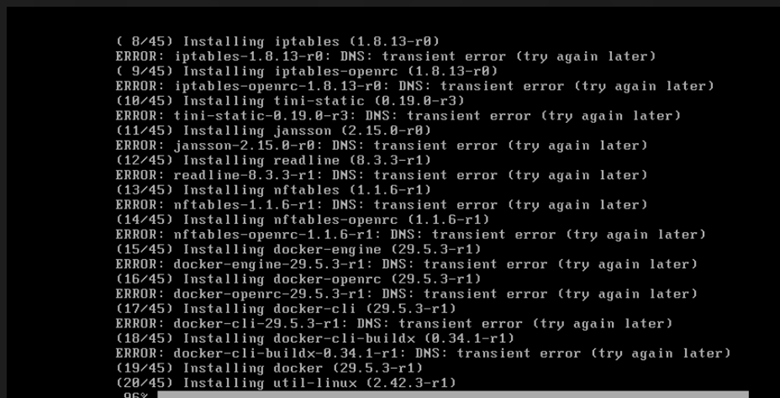
Transient error coming. Hence we will fix this first
Type
Ctrl+C
Check the network
ping -c 3 1.1.1.1
Check your network
Run:
ping -c 3 1.1.1.1
If you get replies, your internet connection works and DNS is the problem.
Let’s Temporarily fix DNS
Run:
printf ‘nameserver 1.1.1.1\nnameserver 8.8.8.8\n’ > /etc/resolv.conf
cat /etc/resolv.conf
Still showing network unreachable then follow these
ip addr
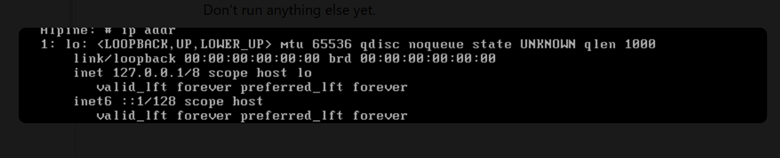
There is no network interface such as eth0 or ens33, so Alpine has no network connection. That’s why 1.1.1.1 is unreachable and DNS cannot work.
Type
dmesg | grep -Ei ‘ethernet|network|vmxnet|e1000’
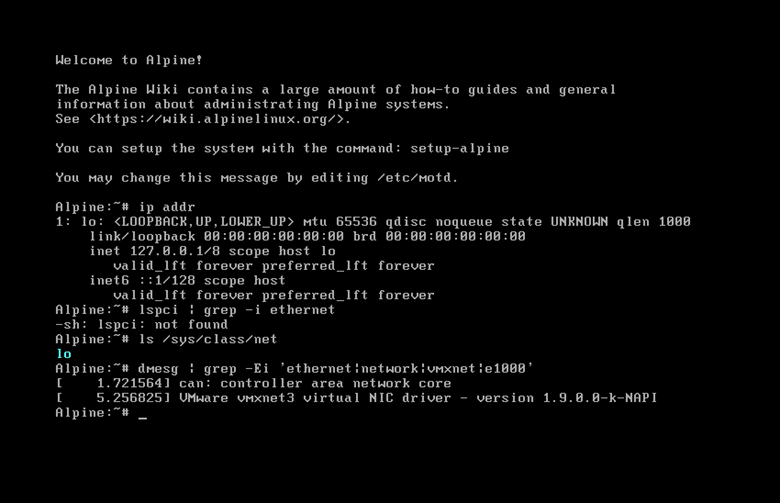
Excellent — this output is useful. Alpine does have the VMware VMXNET3 network driver
Type:
ls /sys/bus/pci/devices/
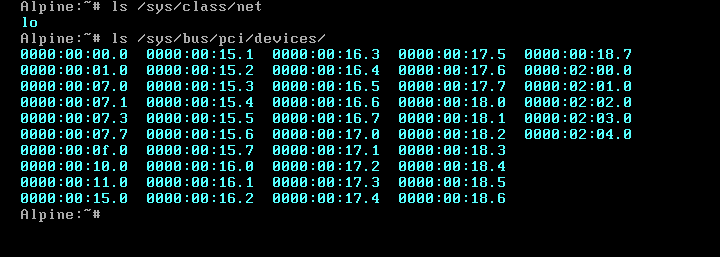
Type
grep -H . /sys/bus/pci/devices/*/class | grep 0x020000
cat /sys/bus/pci/devices/0000:02:01.0/device
Perfect. 0x100f identifies the VMware Intel E1000 virtual network adapter.
Type
modprobe e1000 (Very Important Command)
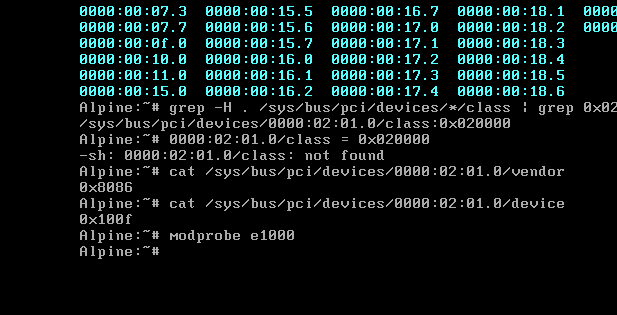
Then, type ip link
ip link set eth0 up
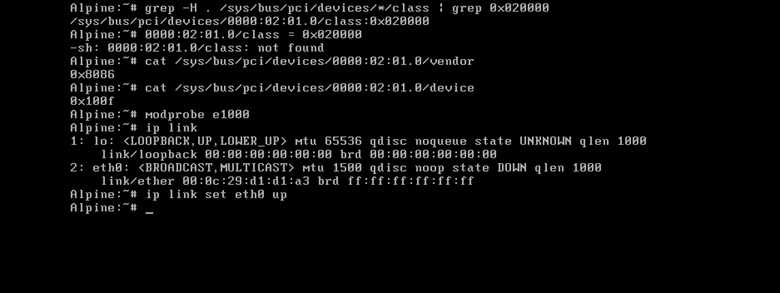
udhcpc -i eth0
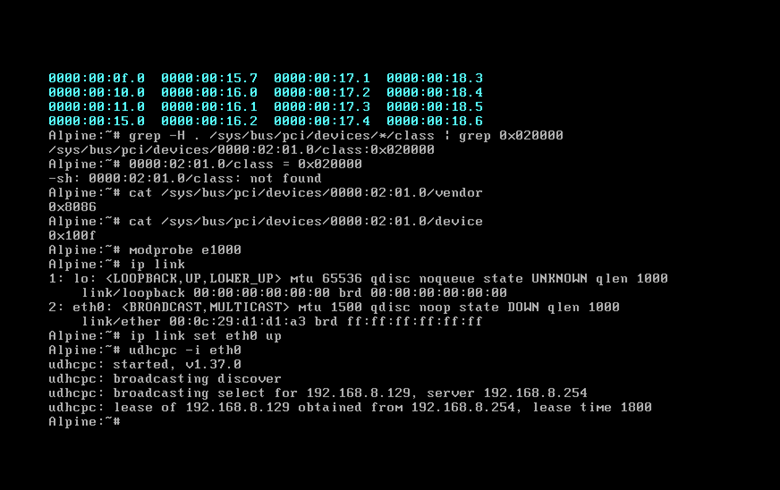
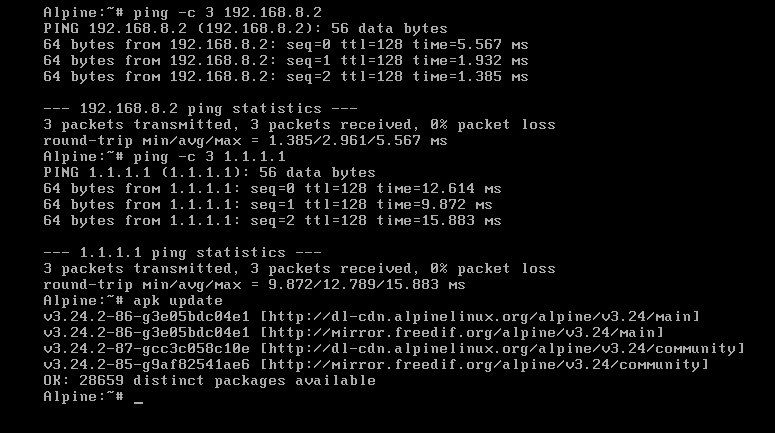
Type ping -c 3 192.168.8.2
This tests the VMware NAT gateway directly. If it fails, we know the problem is VMware networking—not DNS, Alpine, or Docker.
ping -c 3 1.1.1.1
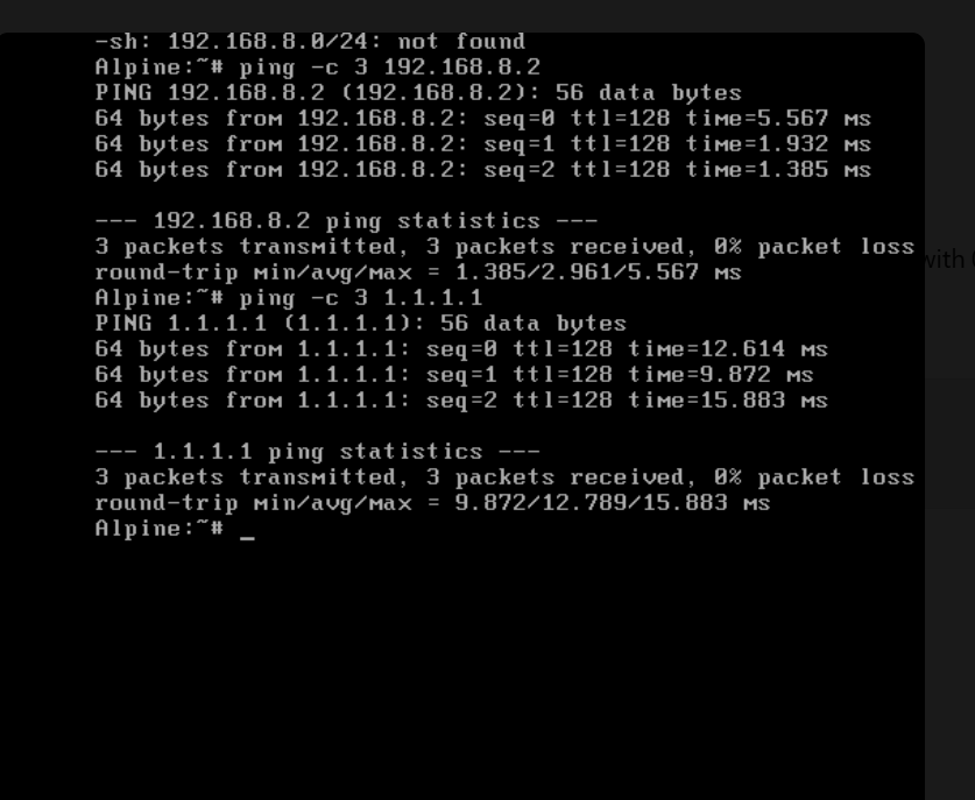
Perfect. Internet connectivity is working now.
We can see:
3 packets transmitted, 3 packets received, 0% packet loss
So now we can finally install Docker.
Next — one command only
apk update
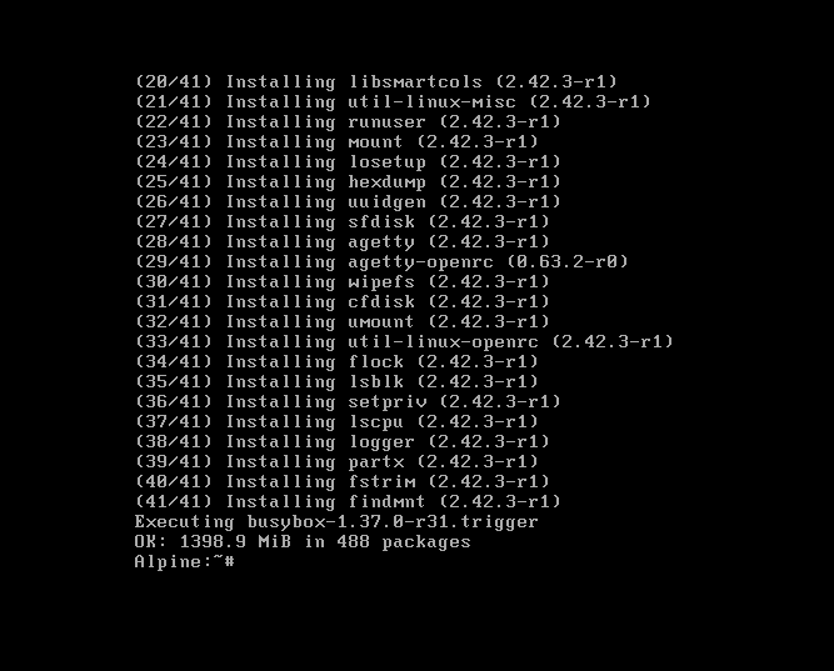
apk add docker
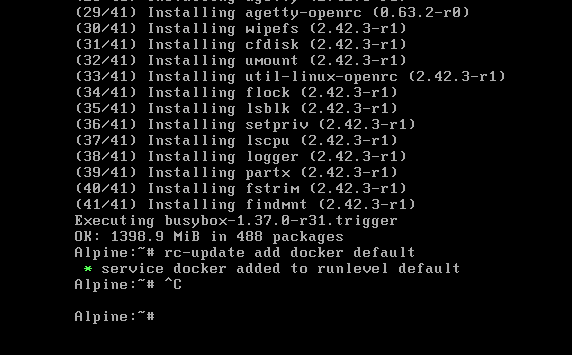
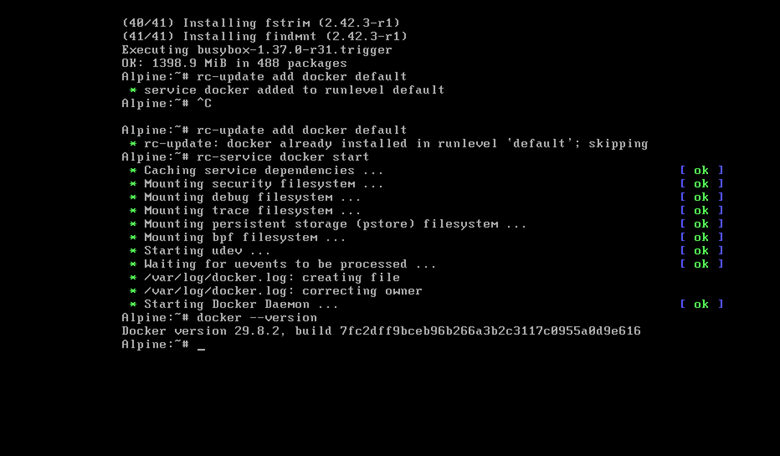
Enable Docker to start automatically when Alpine boots:
rc-update add docker default
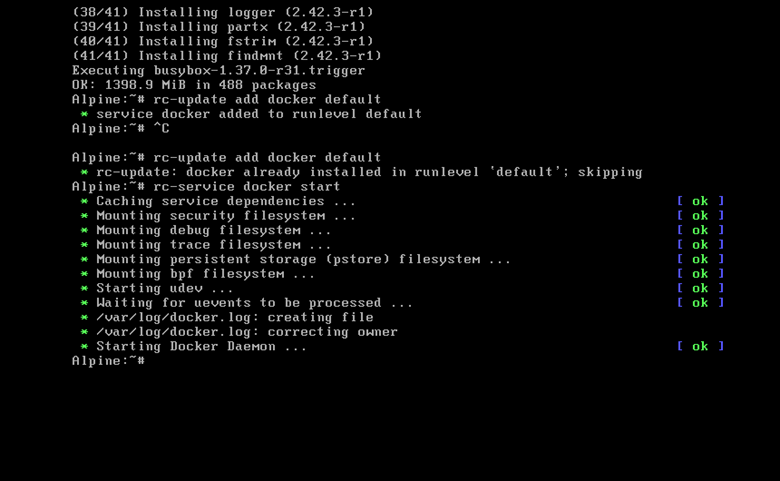
rc-service docker start
docker –version
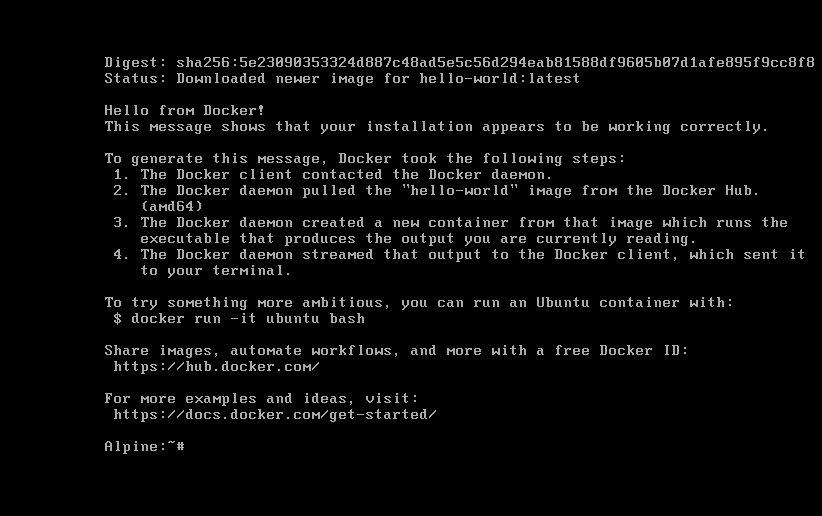
Now test the functionality by typing
docker run –rm hello-world
Don’t Underestimate Networking for Docker Installation
One of the biggest lessons when setting up Docker on Alpine is that Docker depends on the host’s network being healthy first.
If Alpine can’t reach the internet, Docker won’t magically fix the problem.
This becomes even more obvious when Alpine is running inside VMware or another virtualization platform. You have several layers involved:
Virtual network adapter → Alpine network interface → IP address → gateway → DNS → internet
If one of those layers isn’t working, something as simple as downloading a Docker image can fail.
For example, Alpine might boot normally and still have no usable network interface. In that situation, changing DNS settings won’t solve the real problem. You first need a working network interface, an IP address, and a route to the outside world.
This is why a little knowledge of Linux networking goes a long way when working with Docker.
Don’t Ignore Docker Security While or After Docker Installation
Docker makes application deployment easier, but it doesn’t remove the need for good security practices.
The Docker daemon has significant privileges on the host. Access to Docker therefore needs to be treated carefully.
A few sensible practices include:
- Keep Alpine and Docker updated
- Use trusted container images
- Scan images for vulnerabilities
- Avoid unnecessary container privileges
- Expose only the ports you actually need
- Don’t hard-code passwords and secrets into images
- Give applications only the permissions they require
A small operating system can reduce unnecessary software, but it doesn’t automatically make an environment secure.
Security still comes down to how the system is configured and maintained.
Where Docker Compose Fits In
Most real-world applications don’t consist of just one container.
You might have a web server, API, database, cache, and reverse proxy all working together.
Managing all of those containers manually quickly becomes tedious.
That’s where Docker Compose becomes useful.
Instead of remembering a long list of commands, you can describe your application’s services, networks, volumes, and configuration in a Compose file.
This makes the setup easier to reproduce and much easier to share with someone else.
It also means you can bring an entire application stack up or down in a consistent way.
Keep Your Docker Host Clean
A Docker host can accumulate a surprising amount of data over time.
Old images, stopped containers, build caches, logs, and unused volumes can slowly consume your disk.
This is particularly important on Alpine VMs because they’re often created with relatively small virtual disks.
Regularly review your Docker resources and remove things you no longer need.
It’s also worth knowing where Docker stores its data and making sure that important volumes are included in your backup strategy.
The goal isn’t simply to get Docker working today.
The goal is to have a Docker environment you can still trust months or years from now.
Conclusion
Docker on Alpine Linux can be an excellent setup once you understand what’s happening underneath it.
Alpine gives you a lightweight operating system. OpenRC handles services. Docker manages your containers. Networking connects everything together, while volumes protect your persistent data.
Once those pieces make sense, Docker stops feeling like a collection of mysterious commands.
It becomes a predictable tool you can use to build, test, deploy, and manage applications with confidence.
And that’s really the key to mastering Docker in 2026: don’t just learn how to install it—learn how the pieces fit together.
FAQs
Q. Is Alpine Linux a good choice for Docker installation?
A. Yes. Alpine is lightweight and uses relatively few system resources, making it a popular choice for small servers, virtual machines, development environments, and container-focused systems like docker installation.
Q. Is Docker installation different on Alpine?
A. The Docker installation technology itself works in much the same way, but Alpine uses its own package manager and service-management tools. If you’re coming from Ubuntu or Debian, some of the commands and system conventions will be different.
Q. Why does networking matter so much for Docker?
A. Docker needs the host network to download images, reach registries, and communicate with external services. If the Alpine host doesn’t have working networking, Docker-related operations can fail even when Docker itself is configured correctly.
Q. Can Docker Compose be used on Alpine?
A. Yes. Docker Compose is useful when your application consists of multiple services and you want to manage them as a single stack.
Q. Does Alpine automatically make Docker more secure?
A. Not automatically. Alpine’s small footprint can reduce the number of installed components, but you still need to keep the system updated, use trusted images, manage permissions carefully, and follow normal security practices.
Q. Should every Docker container use Alpine?
A. No. Alpine is a great option for many applications, but it’s not the right choice for everything. Always consider application compatibility and the libraries your software requires.
Q. Where should persistent application data be stored?
A. Important data should generally be kept outside the container itself. Docker volumes, bind mounts, databases, and external storage are common choices.
Q. Why can a container have networking problems when Alpine has internet access?
Containers have their own networking layer. Docker networks, DNS, firewall rules, routing, and port configuration can all affect connectivity inside a container.
Q. How often should Docker and Alpine be updated?
A. Regular updates are important for security and reliability. Production environments should ideally use a controlled update process where changes are tested before they’re deployed.
Q. What’s the biggest benefit of running Docker on Alpine?
A. The biggest advantage is the combination of Docker’s flexibility with Alpine’s lightweight design. You get a relatively small host environment while still having access to Docker’s powerful container ecosystem.
Discover more from Root Learning
Subscribe to get the latest posts sent to your email.