Running out of disk space on a Linux server is one of those problems that can sneak up on you. Everything may work normally for days or even months, and then suddenly an application stops writing logs, a service fails to start, or an update refuses to complete because there is no room left.
Alpine Linux is known for being lightweight, which makes it a popular choice for servers, containers, virtual machines, and development environments. But even a minimal Alpine system can gradually consume more storage as applications, logs, caches, and other files build up.
The good news is that freeing up space does not have to be complicated. With a few useful commands and some regular maintenance, you can quickly find what is taking up storage and decide what can safely be removed.
Table of Contents
Why Disk Space Matters on Alpine Linux in 2026?
When you run Alpine Linux, it is easy to assume that storage will never become a problem. Alpine is lightweight and takes up very little space compared with many other Linux distributions. But as you install applications, run services, store files, generate logs, or use containers, your storage needs can grow quickly.
That is why having enough disk space is important. It gives your system room to work normally and helps prevent small storage issues from turning into bigger problems.
Why Is Disk Space Required on Alpine Linux?
The space is needed for much more than the Alpine Linux operating system itself. Every application and service you run needs somewhere to store its data.
For example, a web server may need space for website files and logs. A database needs storage for its data and temporary operations. Containers can use space for images, layers, volumes, and application files. Even everyday system activities can create temporary files and cached data.
As these files build up, available storage gradually decreases.
Having enough free space also matters when updating or maintaining the system. Some operations need additional temporary storage while they are running. If the filesystem is already nearly full, an otherwise routine task can fail.
For a server, this can become especially troublesome. When there is no room left, applications may be unable to save new data or write logs. In some cases, services can stop working properly simply because they cannot create or update the files they need.
Keeping enough free space available gives Alpine Linux room to handle both normal activity and unexpected increases in storage usage.
Steps for Creating New Disk Space in Alpine Linux
Add a Virtual Hard Disk in VMware:
Perform while the VM is powered off for best compatibility.
-Turn off your Alpine Linux VM in VMware Workstation or ESXi.
-Right-click the virtual machine and select Settings (or Edit Settings in vSphere/ESXi).
-Click Add… at the bottom of the Hardware tab.
-Select Hard Disk and click Next.
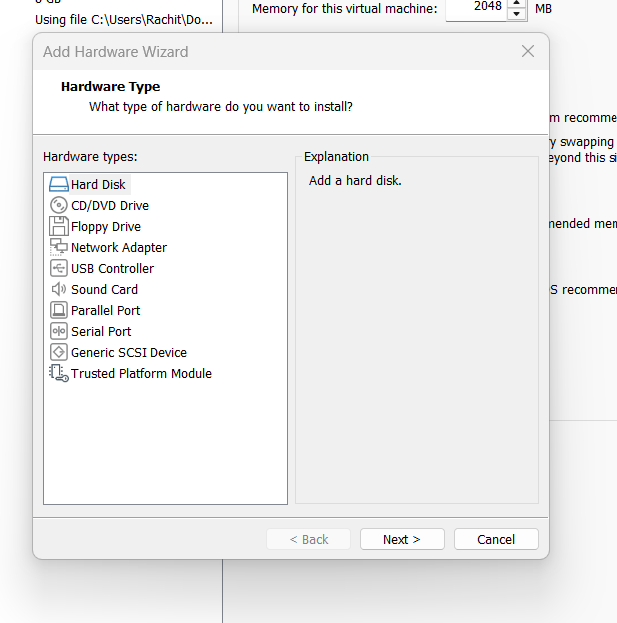
Choose (NVMe or SCSI are standard) and select Create a new
Specify the size (e.g., 20 GB) and finish the wizard.
Click OK to save the settings and power on the VM.
VMware automatically pre-fills a file name like:
Alpine Linux-0.vmdkorAlpine Linux-1.vmdk
Adding Commands in Terminal
First Login
Username like Root
Add command
fdisk -l
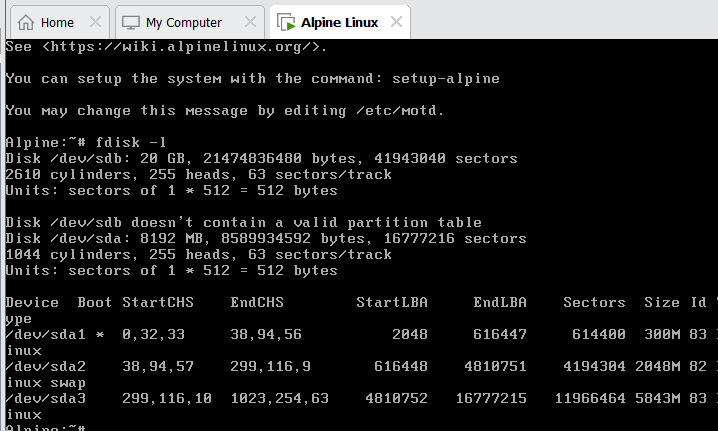
Creation of Partition
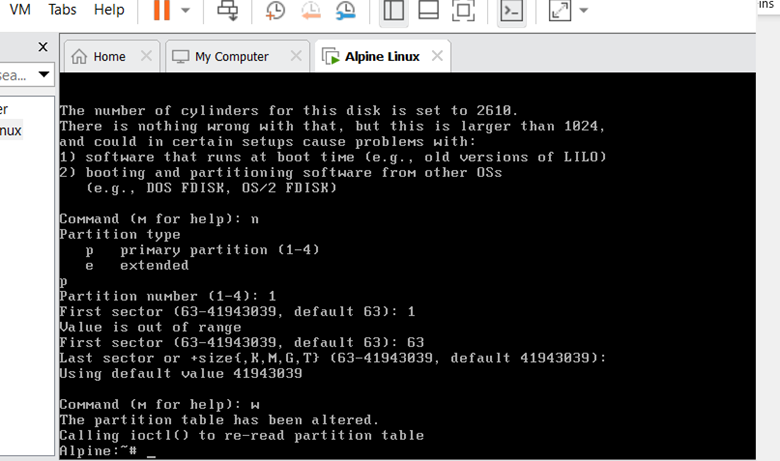
Run fdisk on /dev/sdb:
Bash
fdisk /dev/sdb
Inside the fdisk prompt, type the following keys one by one (pressing Enter after each):
- n — then press Enter for a new partition
- p — then press Enter for a primary partition
- 1 — then press Enter for partition number 1
- Press Enter twice to accept the default start and end sectors (to use the full 20 GB)
- w — to write the changes and exit
Format the Partition
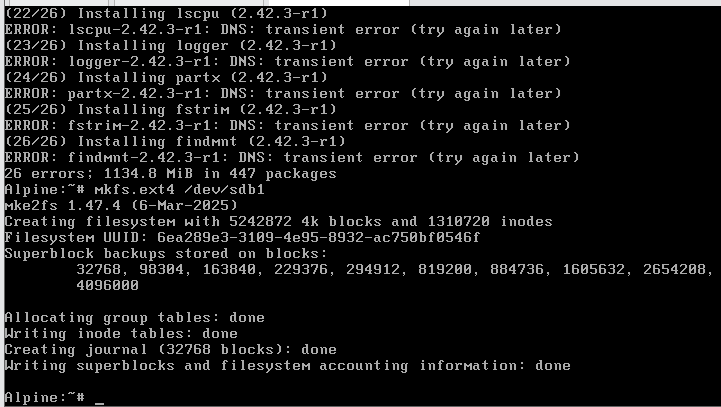
apk update
apk add e2fsprogs
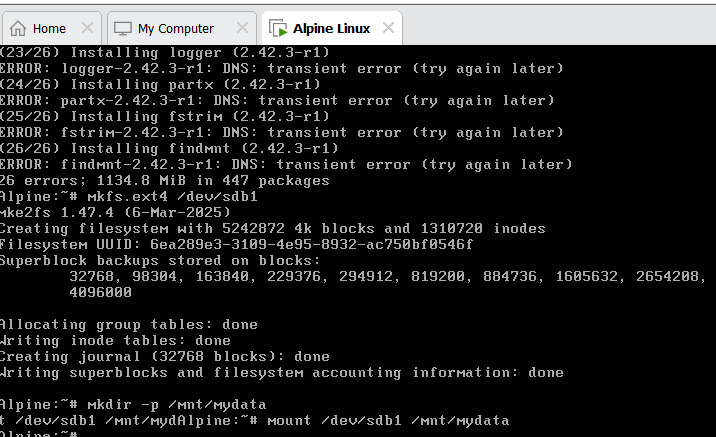
mkfs.ext4 /dev/sdb1
Create a Mount Directory and Mount the Disk
mkdir -p /mnt/mydata
mount /dev/sdb1 /mnt/mydata
Verify the Storage Space
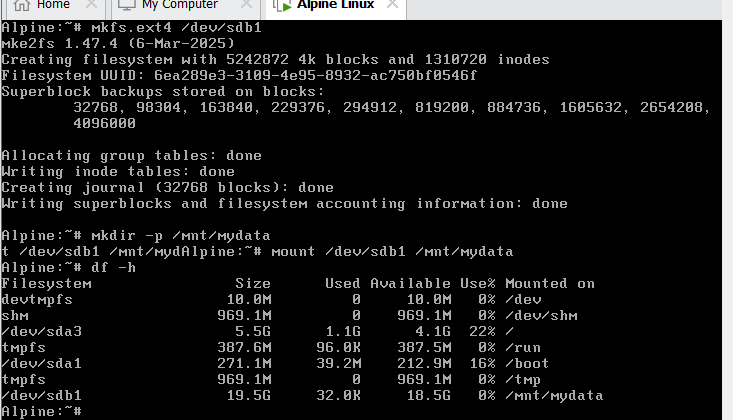
df -h
Make it Permanent Across Reboots
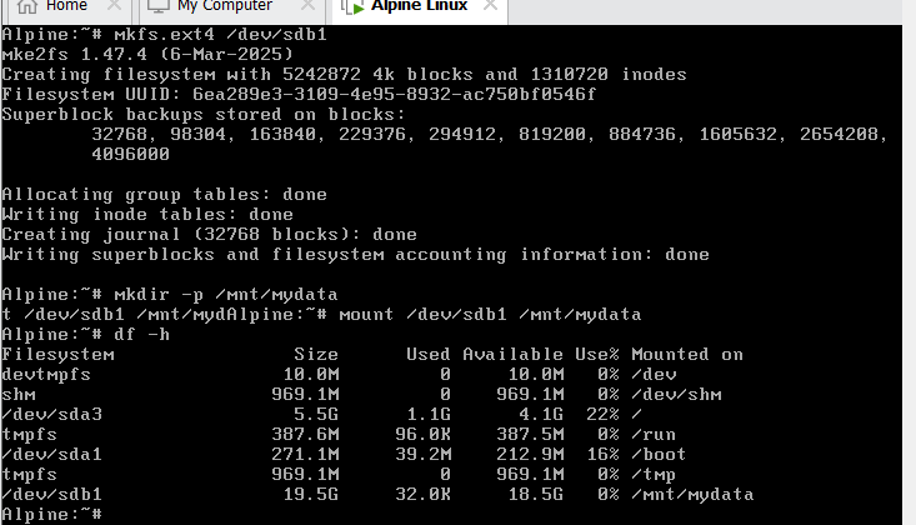
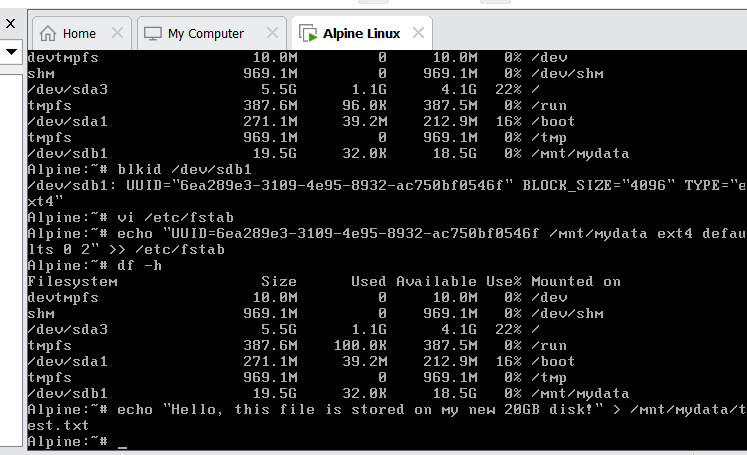
Type echo “UUID=6ea289e3-3109-4e95-8932-ac750bf0546f /mnt/mydata ext4 defaults 0 2” >> /etc/fstab
To check everything is working, press
df -h
Create a test file
echo “Hello, this file is stored on my new 20GB disk!” > /mnt/mydata/test.txt
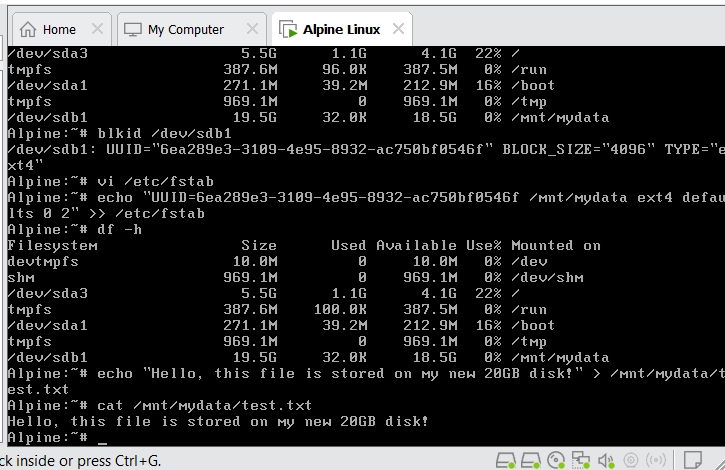
View the file contentents
cat /mnt/mydata/test.txt
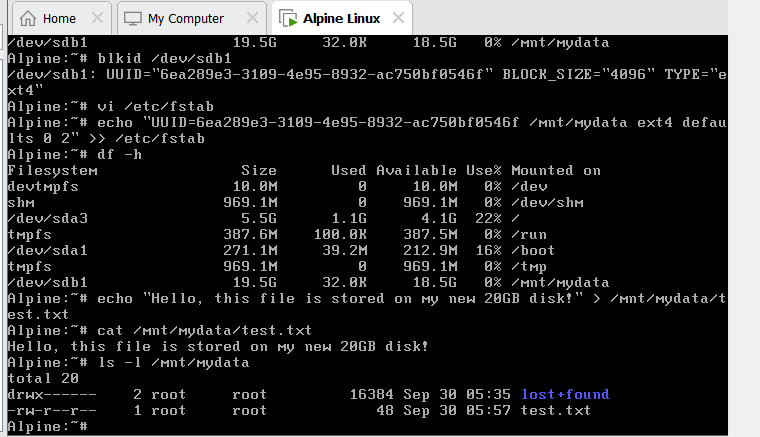
ls -l /mnt/mydata
Benefits of Having More Disk Space
Better Reliability
One of the biggest advantages of having enough space is reliability. Applications have room to create the files they need, while services can continue writing logs and other data without constantly running into storage limits.
This can help prevent avoidable service interruptions.
Room for Applications and Data
More storage gives you greater freedom to run applications and store the data they generate. You do not have to constantly remove useful files simply to make room for something new.
This is particularly helpful when running databases, web applications, development tools, or containerized workloads.
Easier Maintenance
System maintenance can sometimes require additional temporary storage. Updates, package operations, backups, and application changes may all need extra room.
When your system has a healthy amount of free space, these tasks are less likely to be interrupted by storage limitations.
More Reliable Logging
Logs can be extremely useful when troubleshooting a server. They show what applications and services are doing and can help you understand what happened when something goes wrong.
If the space is almost full, however, there may not be enough room for new logs. Having additional storage allows important logs to be retained without constantly worrying about running out of space.
Better Container Management
Alpine Linux is commonly used for container-based workloads, and containers can consume more storage than expected.
Images, unused layers, volumes, build data, and application files can gradually add up. Having enough space makes it easier to manage these workloads and gives containers the room they need to operate normally.
Room to Grow
Your storage requirements today may not be the same a few months from now. An application may gain more users, a database may grow, or you may add new services to the server.
Extra space provides a useful buffer for that growth. Instead of dealing with storage problems every time your workload increases, you have room to expand naturally.
Conclusion
Alpine Linux may have a small footprint, but the workloads running on it can require considerably more storage over time. Applications, logs, containers, databases, temporary files, and other data all contribute to usage.
Having enough free space gives your system room to breathe. It improves reliability, makes maintenance easier, supports growing applications, and reduces the risk of unexpected problems caused by a full filesystem.
For Alpine Linux users in 2026, good storage planning is not just about having a large disk. It is about making sure there is enough available space for the system and its workloads to operate comfortably today while leaving room for tomorrow’s growth.
FAQs
Below are the FAQs:
Q. What Happens When Disk Space Gets Too Low?
A. Running low on storage can cause more problems than simply preventing you from saving another file.
An application might fail to write important data. A database could run into trouble when it needs temporary storage. Logs may stop being recorded, and updates or maintenance tasks may fail.
In some situations, a full filesystem can affect multiple services at once. What starts as a simple storage issue can quickly become a broader server problem.
Q. Does having more disk space improve Alpine Linux performance?
A. More space does not automatically make Alpine Linux faster. However, maintaining enough free space helps applications and system processes work normally and reduces problems caused by a nearly full filesystem.
Q. Is disk space important for Alpine Linux containers?
A. Yes. Container images, layers, volumes, caches, and application data can consume significant storage. Adequate disk space makes it easier to run and manage containerized workloads.
Discover more from Root Learning
Subscribe to get the latest posts sent to your email.