Docker has changed the way developers build, package, and run applications. Docker containers is one of the most popular setup that is done along with Docker. One of the main reasons developers prefer Docker is that it allows them to package an application and its dependencies into a Docker container. It helps applications work consistently across different environments, making development and deployment much easier.
When choosing a lightweight environment for containers, Alpine Linux is a popular option. It’s a small, simple Linux distribution that includes only the essential components needed to build a customized environment.
Using Docker with Alpine Linux can help developers create efficient containers, reduce unnecessary software, and simplify application management. However, choosing the right image, understanding compatibility, and following security best practices are all important parts of the process.
In this guide, we’ll explore everything you need to know about a docker container on Alpine Linux, including its benefits, essential components, configuration considerations, common problems, and security practices. Whether you’re new to Docker or looking to improve your existing container environment, this guide will help you understand the basics.
Table of Contents
What Is a Docker Container on Alpine Linux?
A docker container is an isolated environment where an application runs along with the files, libraries, and dependencies it needs. It helps developers avoid common problems caused by differences between development, testing, and production environments.
Unlike a traditional virtual machine, a container shares the host operating system’s kernel. This makes it generally more lightweight and faster to start than a complete virtual machine.
Alpine Linux is a good option for building Docker containers because of its minimal design. Instead of including a large collection of unnecessary tools, it provides a small foundation that developers can customize according to their application’s requirements.
Some key benefits include:
- Smaller image sizes: Lightweight images require less storage and can be quicker to transfer.
- Simplified management: Fewer unnecessary packages can make Docker containers easier to maintain.
- Application isolation: Different services can run in separate Docker containers.
- Portability: Applications can run consistently across compatible environments.
- Efficient deployment: Small images can help streamline application delivery.
Although Alpine Linux offers several advantages, it’s important to check whether your application and its dependencies are compatible before choosing it.
Docker Containers Installation Guide
Follow the steps for installation.
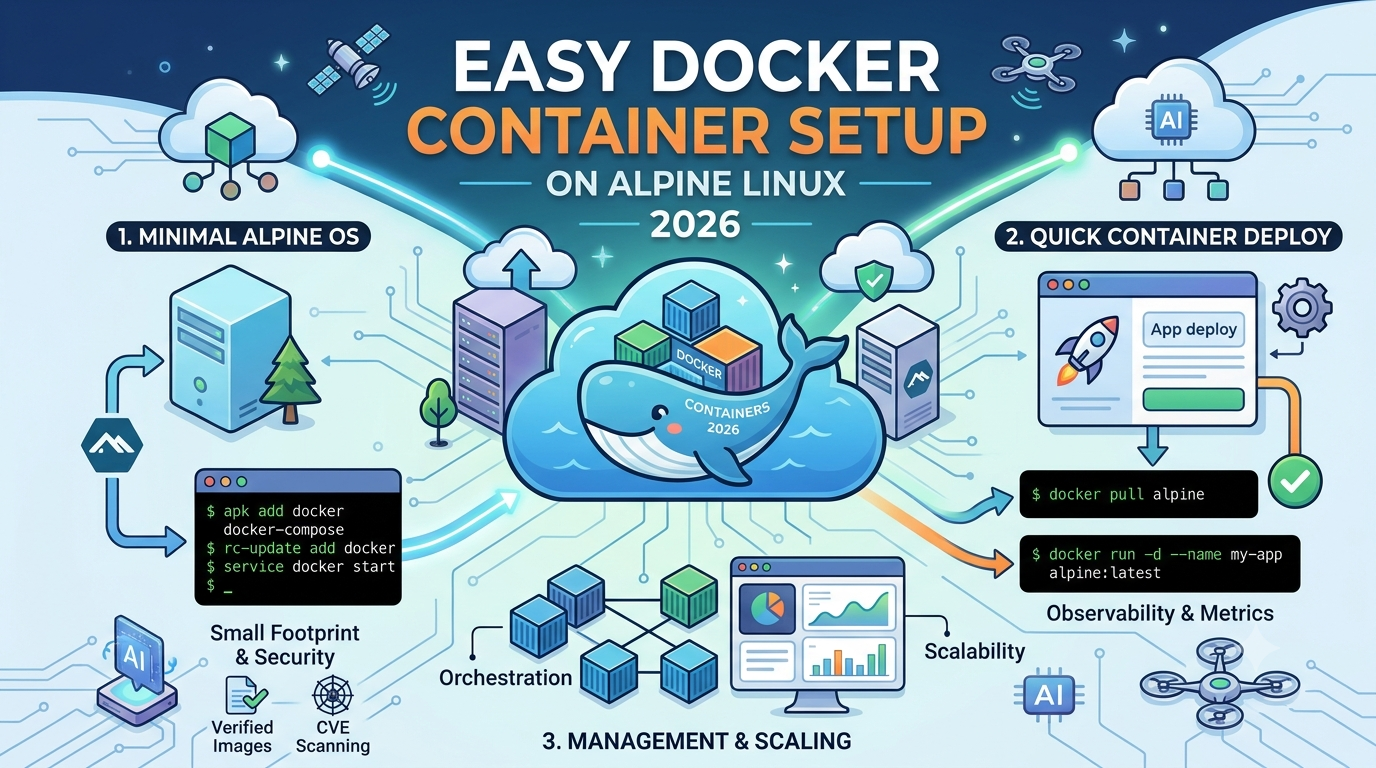
First, log in with a username and password. Then type the following:
docker –version
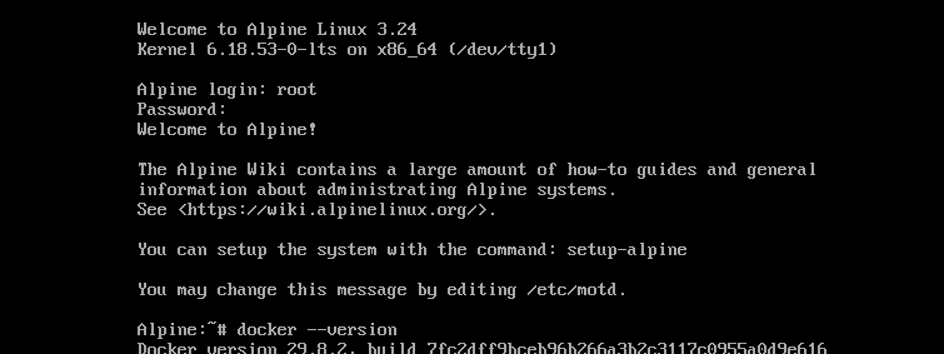
Check whether the Docker daemon is running. For this, type the following:
docker info
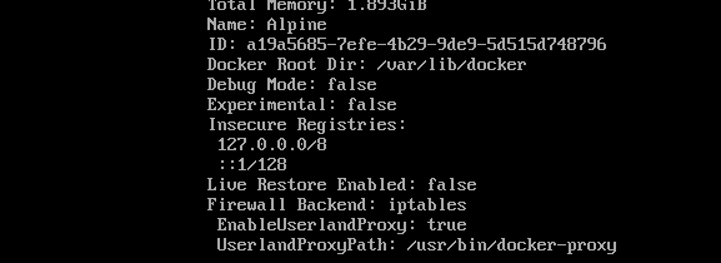
We can proceed to create your first container.
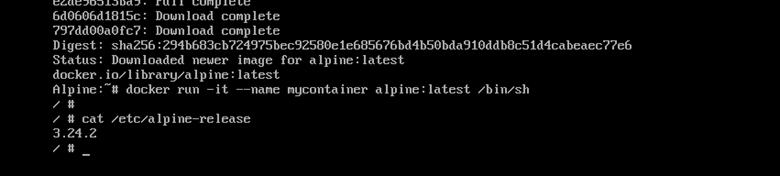
Download the Alpine image. Type
docker pull alpine:latest
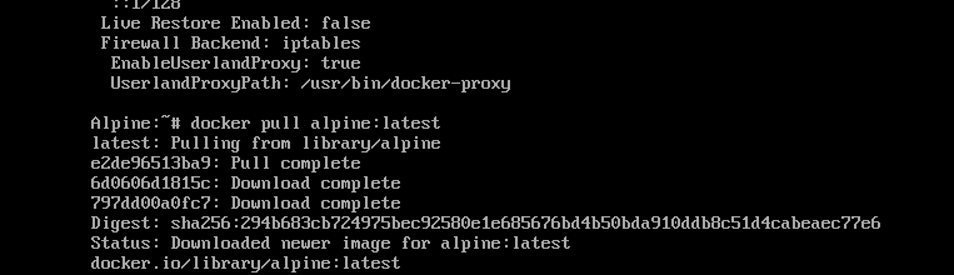
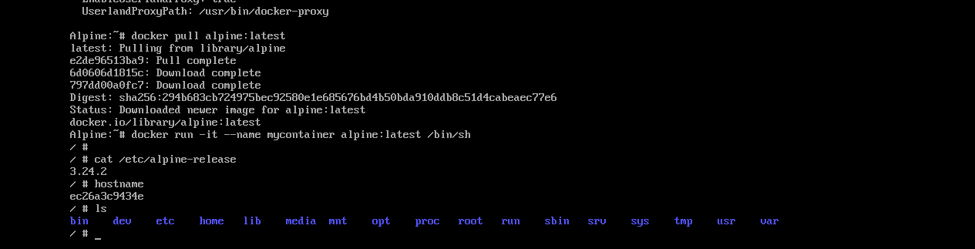
docker run -it –name mycontainer alpine:latest /bin/sh
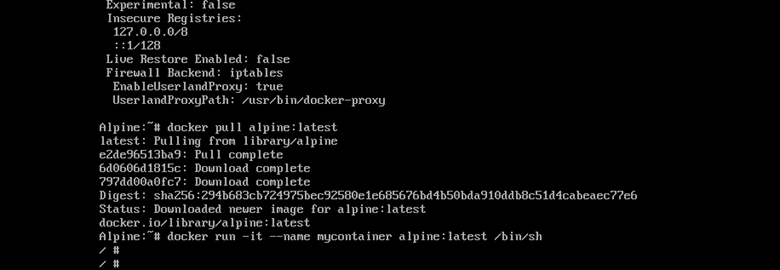
cat /etc/alpine-release
Check the container hostname:
Hostname
List files inside the container:
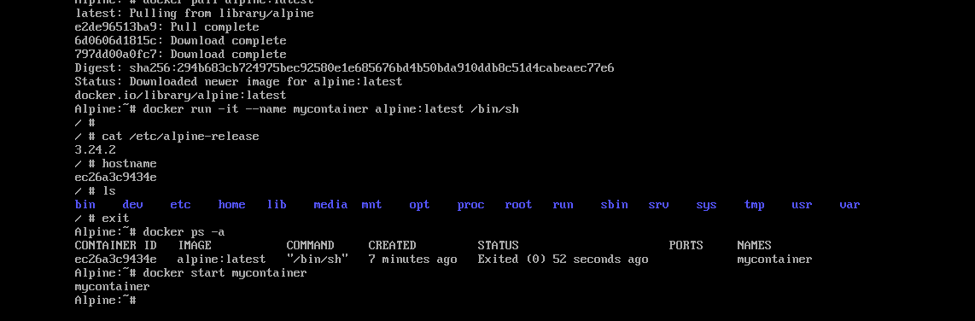
Exit the Docker containers
exit
Verify your Docker containers from the host

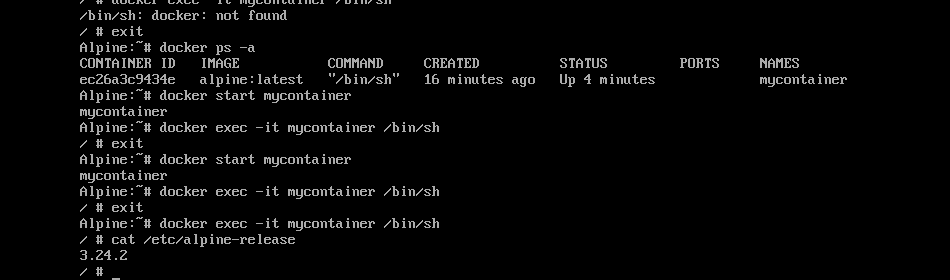
Start the container again
docker start mycontainer
docker exec -it mycontainer /bin/sh
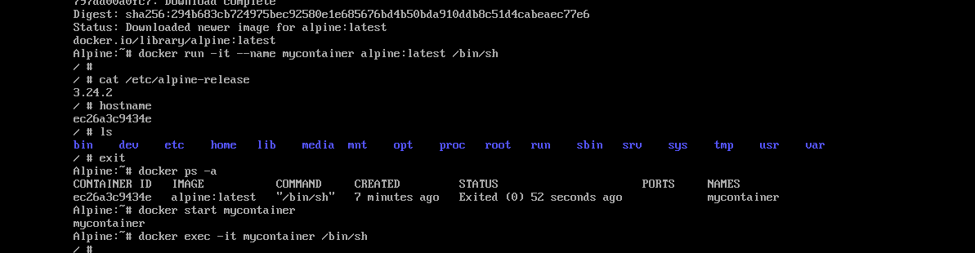
Let’s verify that your Docker container is working.
Understanding the Main Components of a Docker Container
Before managing a docker container, it’s helpful to understand the components that make it work.
Docker images
A Docker image is the template used to create a container. It contains the application’s files, dependencies, and other information needed to run the software.
An Alpine-based image starts with a minimal Linux environment, which can then be adapted to suit the application.
Docker containers
A container is an instance created from an image. Multiple containers can use the same image while running independently.
For example, a website might use one container for its application and another for background processing.
Container registries
Container registries store and distribute images. They help developers share application packages and deploy consistent versions across different environments.
Private registries can also help organizations control access to approved images.
Persistent storage
A Docker container should not be the only place where important data is stored. Containers can be replaced or recreated, and information held only in their writable layer may be lost.
Persistent volumes or external storage are better choices for database records, user uploads, and other important files.
Container networking
Networking allows containers to communicate with each other and with external services.
A properly organized network helps applications exchange information while limiting unnecessary access.
Understanding these components makes it easier to build a reliable container environment and troubleshoot problems when they occur.
Choosing the Right Alpine Image for Your Docker Container
Choosing the right base image is an important part of building a Docker container. While Alpine is known for its small size, the best image depends on the application’s requirements.
Start by considering the programming language, runtime, libraries, and external services your application needs.
A simple web service may work well with a minimal Alpine image, while software that relies on several native libraries may require additional configuration.
Keep the following factors in mind:
- Application compatibility: Check that the application and its dependencies support Alpine Linux.
- Image maintenance: Choose images that receive appropriate updates.
- Version control: Keep image versions consistent to make deployments more predictable.
- Security: Understand where images come from and whether their contents can be verified.
- Required libraries: Confirm that essential runtime components are available.
One common compatibility issue involves the C standard library. Alpine Linux uses musl libc, while many other Linux distributions use glibc. Some precompiled applications depend on glibc-specific behavior and may not work correctly in Alpine.
This doesn’t mean Alpine is a poor choice. It simply means testing compatibility early can save time later.
In some situations, using a slightly larger base image may be the more practical option.
Common Docker Containers Problems on Alpine Linux
Even a carefully planned container environment can experience problems. Knowing what to look for makes troubleshooting less stressful.
Missing libraries or dependencies
An application may fail to start because a required library is unavailable or incompatible with Alpine. This can happen when software expects a glibc-based environment.
Review the application’s dependencies and verify their compatibility with the selected image.
Unexpected application failures
Differences between development and production settings can cause an application to behave differently across environments.
Keeping configurations and image versions consistent can help prevent these issues.
File permission problems
A Docker container may be unable to access certain files or directories because of incorrect ownership or permissions. This is particularly common when persistent storage is attached.
Check the application’s access requirements and make sure permissions are configured appropriately.
Docker Containers stopping unexpectedly
A container can stop when its primary application process exits. The cause may be an application error, incorrect configuration, or an unavailable dependency.
Application logs and exit information are useful starting points when investigating the issue.
Networking failures
Docker containers may be unable to reach another service because of incorrect addressing, network restrictions, or an unavailable application.
Review the intended communication path and confirm that the required services are healthy.
Increasing image size
Adding unnecessary packages and temporary files can make an image larger than expected.
Reviewing image contents and separating build-time dependencies from runtime requirements can help keep your Docker container lightweight.
Preparing a Docker Container for Production
Running a container on a development machine is relatively straightforward, but production environments require more planning.
Start by keeping track of image versions and application dependencies. A consistent build and testing process helps prevent unexpected changes during deployment.
Health checks can help determine whether an application is actually working, rather than simply running as a process. Centralized logging and monitoring also make it easier to investigate failures across multiple Docker containers.
Persistent data should have a clear backup and recovery plan. Regular backups are useful, but recovery procedures should also be tested to make sure important information can be restored when needed.
It’s equally important to keep development, testing, and production environments as consistent as possible. Differences in configuration and dependencies can create problems that are difficult to reproduce.
Finally, review your choice of Alpine Linux as the application evolves. If new dependencies introduce compatibility issues, another Linux distribution may be easier to maintain.
The goal is to find a balance between image size, compatibility, security, and long-term reliability.
Conclusion
Using Docker with Alpine Linux is a practical way to create lightweight and manageable application environments. Alpine’s minimal design can reduce unnecessary components, while Docker makes it easier to package, isolate, and deploy applications.
However, building a reliable Docker container involves more than choosing a small image. Compatibility, configuration, networking, storage, security, and monitoring all play an important role.
By selecting the right base image, keeping services organized, protecting sensitive information, and maintaining a consistent deployment process, developers can create Docker containers that are easier to manage and more dependable in production.
Whether you’re building a small website or managing a collection of microservices, understanding these fundamentals will help you make better decisions as your container environment grows.
FAQs
Below are the FAQs:
Q. What are Docker containers?
A. A Docker container is an isolated environment that packages an application and the components it needs to run. It helps applications behave consistently across compatible development, testing, and production environments.
Q. Why use Alpine Linux for Docker containers?
A. Alpine Linux is lightweight and includes relatively few unnecessary components. This can help reduce image size, simplify maintenance, and improve image transfer efficiency.
Q. Is a Docker container on Alpine Linux suitable for beginners?
A. Yes. Alpine can be a useful starting point for beginners who want to learn about lightweight containers. However, it’s important to understand application dependencies and compatibility requirements.
Q. What is the difference between a Docker image and a Docker container?
A. A Docker image is the packaged template used to create an application environment. A docker container is an instance of that image running as an isolated process. Multiple containers can share the same image.
Q. Can every application run in an Alpine-based Docker container?
A. No. Some applications depend on glibc or other libraries that may not be directly compatible with Alpine’s musl libc environment. Testing the application’s dependencies before selecting a base image is important.
Q. Is an Alpine-based Docker container secure?
A. It can provide a good security foundation because it includes fewer unnecessary components. However, security also depends on regular updates, appropriate permissions, vulnerability scanning, and proper secrets management.
Q. How can data be preserved when a Docker container is replaced?
A. Important data should be stored in persistent volumes or external storage rather than relying only on the container’s writable layer. Regular backups and tested recovery procedures help protect critical information.
Q. Can multiple Docker containers communicate with each other?
A. Yes. Docker networking allows containers to communicate through configured networks and service endpoints. Access should be limited to the services that need to exchange information.
Q. How can I optimize a Docker container on Alpine Linux?
A. Choose an appropriate base image, remove unnecessary dependencies, keep build-time components out of production images, and monitor resource usage. Always consider compatibility and maintainability alongside image size.
Q. Is Alpine Linux suitable for production Docker container deployments?
A. Yes. Alpine can be a good production choice when the application is compatible and the environment is properly maintained. Regular updates, monitoring, security checks, and reliable backup procedures are essential.
Discover more from Root Learning
Subscribe to get the latest posts sent to your email.