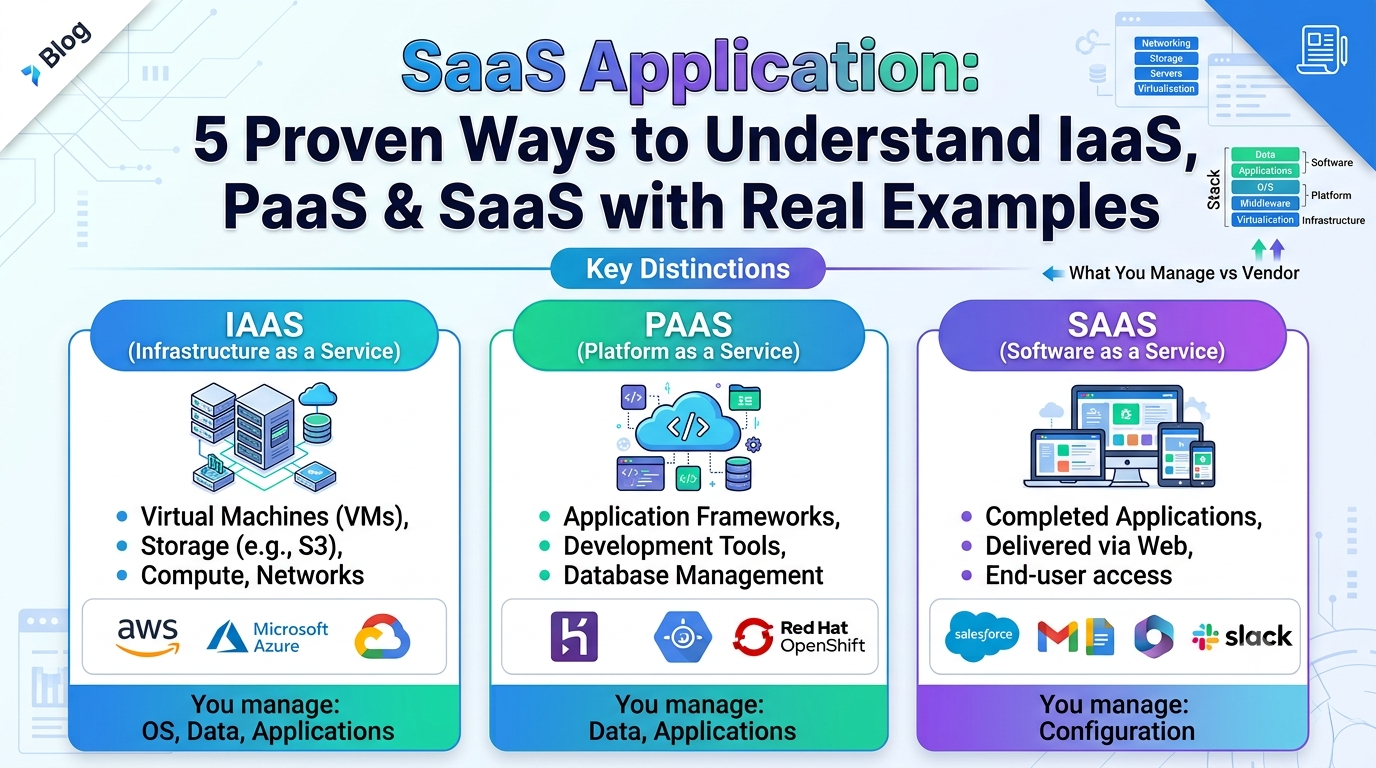
SaaS application, PaaS, IaaS, these terms might confuses you, so this guide will walk you through real-world examples until the differences become clear.
You’ve probably heard about SaaS applications more times than you can remember, and you probably started to use one prior to your first cup of coffee in the morning. Gmail, Slack, Notion, Spotify… these are all a SaaS application in action. However, one part of the puzzle that nobody seems to be able to account for: Knowing what a SaaS application is not the same thing as understanding how it fares against IaaS PaaS.
In fact, whether you are just starting as a developer, are new to the world of cloud computing, or both, a lack of this awareness will lead you straight into errors not only on job interviews and during architectural conversations but even just browsing jobs!
Even then I’ve seen plenty of students learn the definitions by heart and get tripped up as soon as a further query comes their way. So instead of giving you three detailed definitions that you might forget by the end of next week, we’re going to learn by constructing that meaning. 5 approaches, 5 different perspectives on the same thing.
Table of Contents
A Brief Overview On SaaS, PaaS, and IaaS
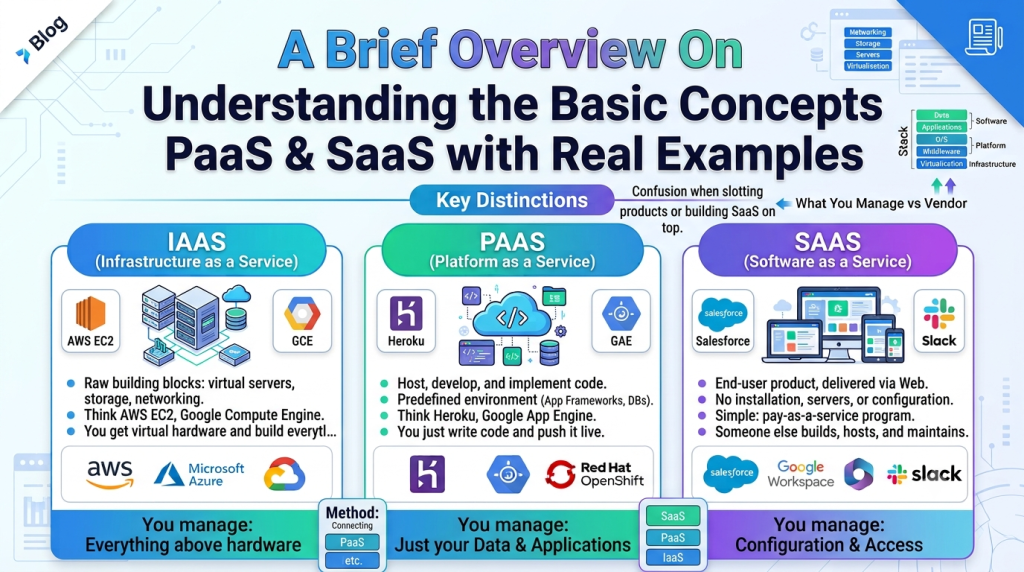
First, let’s understand the basic concepts before heading towards to the real examples.
IaaS (Infrastructure as a Service) gives you the raw building blocks: servers, storage, networking. Think AWS EC2 or Google Compute Engine. You get the hardware, virtually, and you build everything on top of it yourself.
Platform as a Service, or PaaS, allows you to host, develop, and implement your code in a predefined environment. Think Heroku or Google App Engine. You don’t touch the servers. You just write code and push it live.
SaaS (Software as a Service) is the end product. You just log in and use it. No installation, no servers, no configuration. In simple terms, SaaS apps are programs that you pay as a service. Someone else builds them, someone else hosts them, someone else takes care of the rest of it.
Simple enough on paper. But all the confusion begins to occur when you try to slot a particular product into one of those boxes, or you are asked how SaaS software can be actually created on top of those other two stacks. That is where these five methods come in.
Method 1: The Pizza Analogy Model (It is Traditional, Yet It is Effective)
If you have spend enough time working in cloud computing, you will find yourself running into the pizza analogy model. It sticks around for a reason too.
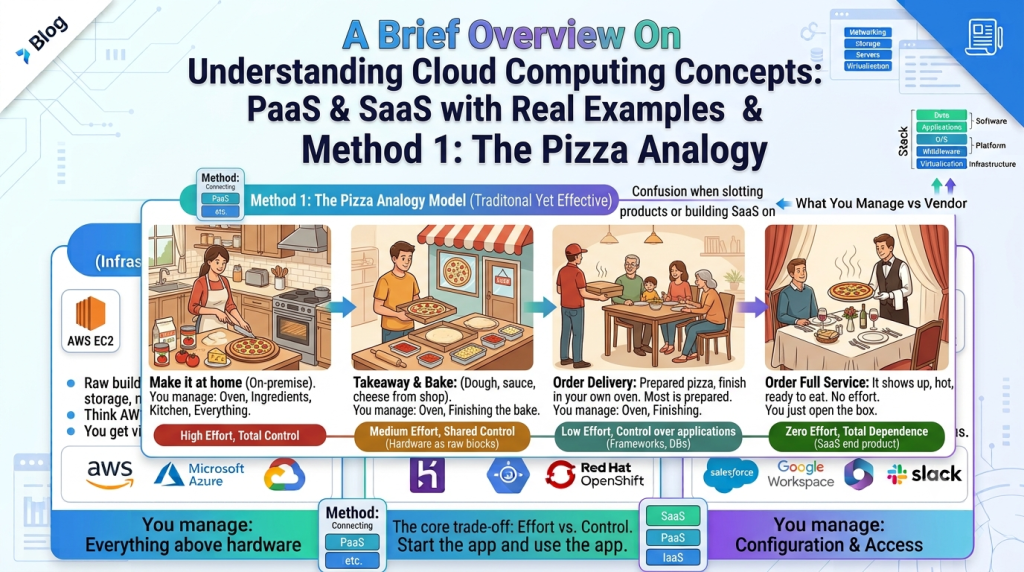
Imagine three ways to get pizza:
- Make it at home (on-premise): You buy the oven, the ingredients, and the kitchen. You do everything.
- Prepare it with an entire equipment (IaaS): The dough, sauce, and cheese are supplied by another person.
- Get takeaway and baking it yourself (PaaS): Most of the pizza is prepared. You just finish it in your own oven.
- Order delivery (SaaS): It just shows up, hot, ready to eat. No effort from you beyond opening the box.
A SaaS application provides just that final step. Fixing bugs, server administration, and producing deployment scripts are not required. You start the app and you can use the app. This comparison is far more helpful than an academic definition when describing a SaaS service to a beginner.
The reason this analogy works so well for beginners is that it maps effort to responsibility. You become more dependent on a third-party infrastructure the less work you put in. And that trade-off, effort versus control, is the entire story of cloud computing.
Method 2: Pair Each Layer With a Familiar Product That You Usually Use
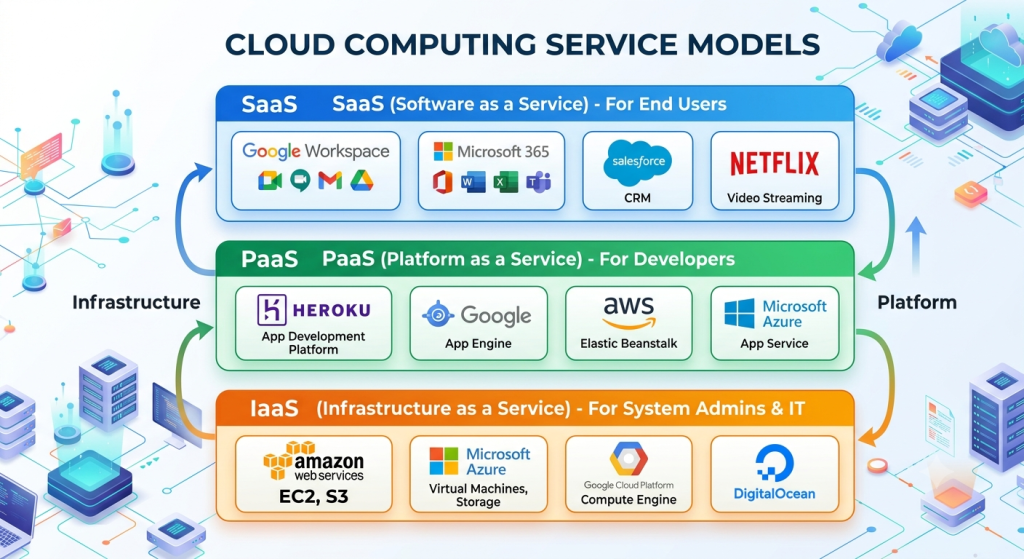
While analogies are useful, nothing matches to real-world scenarios. The easiest way to understand what the SaaS is, is to take a look at how many applications you are already using on a daily basis. Let’s take a closer look at some examples for each layer.
IaaS examples:
- Amazon EC2
- Microsoft Azure Virtual Machines
- Google Compute Engine
- DigitalOcean Droplets
PaaS examples:
- Heroku
- Google App Engine
- AWS Elastic Beanstalk
- Render
SaaS application examples:
- Gmail (email, fully managed)
- Dropbox (file storage, fully managed)
- Salesforce (CRM, fully managed)
- Zoom (video conferencing, fully managed)
- Canva (design tool, fully managed)
Notice something? Every single SaaS application in that list solves a specific problem for the end user without asking them to think about servers, code, or deployment at all. When you join a call, you’re unlikely to care what kind of infrastructure Zoom uses. You just click the link.
This is probably one of the fastest tests of intuition. Ask yourself, “Is this a SaaS application or is it something that I am building on top of a platform?” the next time you are opening an application up on your desktop or phone. The applications which you use for day-to-day non-development-related tasks are most likely to be SaaS.
The IaaS and PaaS categories, on the other hand, would encompass the development platforms that you use to build your own applications.
Method 3: Ask “Who’s Responsible for What?”
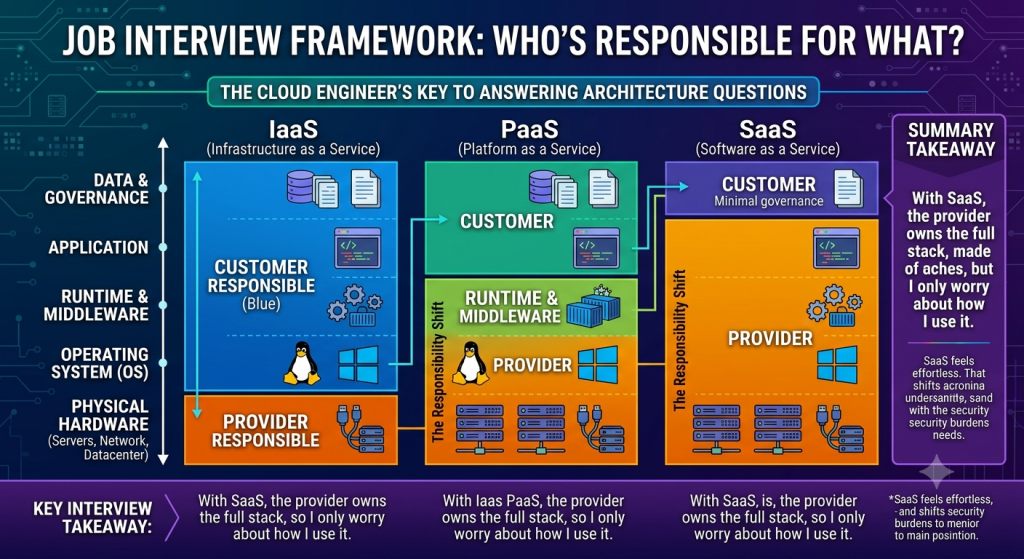
Here’s a method that beginner cloud engineers often skip, and it’s probably the most useful one for actual job interviews: figure out the responsibility split.
For every cloud model, ask who manages:
- The physical hardware
- The operating system
- The runtime and middleware
- The application itself
- The data
With IaaS, the provider handles the hardware. You handle everything else, from the OS up to the data.
With PaaS, the provider handles hardware, OS, and runtime. You just handle your application code and data.
With SaaS, the provider handles literally everything, hardware, OS, runtime, application, and often even a chunk of the data governance. You just show up and use the product.
This responsibility model is why a SaaS application feels so effortless from the user’s side. Somebody else absorbed every layer of complexity so you don’t have to. It’s also why security responsibilities shift depending on which model you’re working with, something that trips up a lot of new engineers who assume “the cloud” means someone else handles all the security. It doesn’t. The shared responsibility model changes shape depending on which service type you’re using, and a SaaS application puts the least security burden on you as the user.
If you’re prepping for interviews, this is the framework interviewers actually want to hear. Not “SaaS is software,” but “SaaS means the provider owns the full stack, so I only worry about how I use it.”
Method 4: Trace How One SaaS Application Gets Built on Top of the Other Two
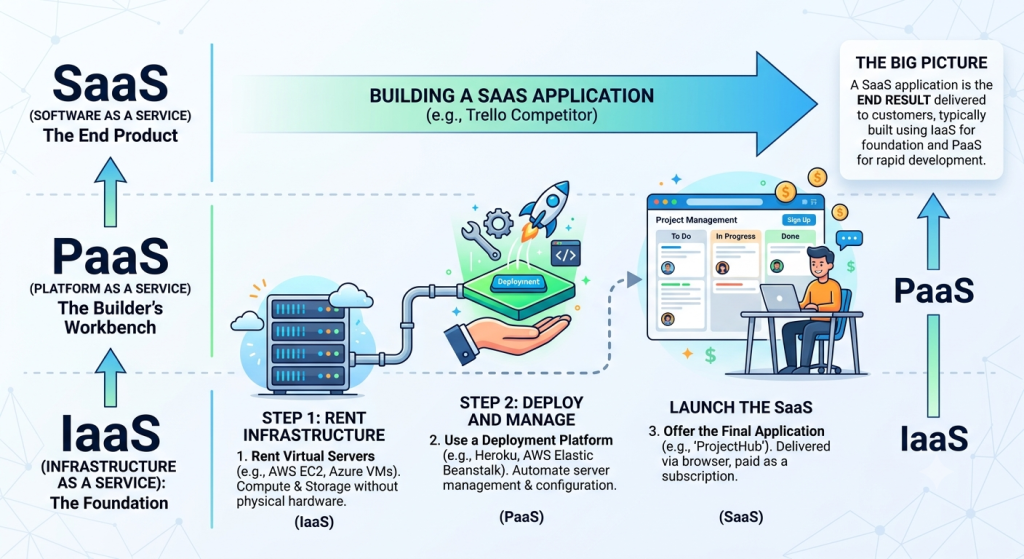
This is where things click for a lot of people, because it shows the layers working together instead of sitting in isolation.
Let’s say a startup wants to launch a project management SaaS application, something like a scrappy Trello competitor.
Here’s roughly how the build might go:
- Step 1: They rent virtual servers from AWS or Azure. That is IaaS. It gives them compute power without buying physical machines.
- Step 2: Instead of managing that infrastructure by hand, they use a platform like Heroku or AWS Elastic Beanstalk to deploy their code without worrying about server configuration. That is PaaS.
- Step 3: Once the product is built, tested, and hosted, they open it up to customers who sign up, pay a monthly fee, and use it through a browser. That final product, the one customers interact with, is the SaaS application.
So a SaaS application isn’t some separate, disconnected thing floating above IaaS and PaaS. It’s usually the end result of a company using IaaS and PaaS to build something, then packaging it up and delivering it as a finished, ready-to-use product.
This is honestly the piece most beginner explanations skip. They treat IaaS, PaaS, and SaaS like three unrelated categories instead of showing how a single SaaS application is typically born from the layers underneath it. Once you see that flow, the whole model stops feeling abstract.
Method 5: Construct a Small Project Using All Three Models on Your Own

You can only go so far by reading about the differences. Build something little and see the change for yourself if you want the idea to truly stick.
Try this project for the weekend:
- Launch an IaaS virtual machine. Make use of a free tier on DigitalOcean or AWS. Manually set up a simple web server. Take note of how much you have to set up yourself, including storage, firewall rules, upgrades, and more.
- Use a PaaS to launch a small application. Push a basic Python or Node.js application to Render or Heroku. Take note of how much quicker this is. Simply code and deploy without setting up a server.
- Manage the project using a real SaaS application. Use Trello or Notion to monitor your progress. Observe that nothing was installed by you. You recently registered and began using it.
By engaging in this practical process, the distinctions become tangible rather than abstract. You’ll see that IaaS requires more work. You’ll experience the relaxation that PaaS provides. Because someone else completed the IaaS and PaaS work for you before wrapping it in a tidy UI, you’ll notice that a SaaS application eliminates nearly all friction.
I think this is the finest approach to study this stuff. Definitions change over time. It doesn’t with muscle memory.
Typical Errors New Users Make When Using SaaS Applications
Let’s eliminate a few common myths.
Error 1: Believing SaaS to be “simple” to develop. While SaaS software can be simple to use, that doesn’t always mean that the software was simple to build. Every well-designed SaaS program is the result of a complex web of security effort, scaling issues, and infrastructure choices.
Error 2: Thinking SaaS, PaaS and IaaS are not at all related. IaaS and PaaS are frequently used underneath SaaS applications, as Way 4 demonstrated. They are not rivals; they are layers.
Error 3: Equating “cloud-hosted” with “SaaS” erroneously leads us to believe that all cloud applications are SaaS. If your business buys custom software and uses it as-is on the rented AWS infrastructure, even if this is in the cloud, that would technically be IaaS, not SaaS.
Error 4: The fourth error is to forget the difference of business models. Indeed, SAAS products usually use a subscription model based monthly or annually. It’s not simply the technical distribution technique that characterizes SaaS as a category, but also that recurring revenue model.
Error 5: Assuming that a SaaS application does not involve you making any technical contributions to the program itself. Even with a SaaS application, usually some form of configuration needs to happen, whether for the consumer or business. For example, you will likely need to configure automation rules within a CRM, integrate extensions within Notion, and set permissions within Slack. It’s controlled infrastructure, not effortless.
Getting the difference right is critical, more than we may ever know. And this point will really drive home once you get to work on real-life teams and someone says, “Oh, yeah…just do SaaS for that” at a meeting!
Why This Is Important for Your Professional Life, Not Just Your Notes
Here’s something worth sitting with for a second. Most beginner cloud engineers learn these terms to pass a quiz or an interview, then forget the nuance the moment they’re on the job. That’s a mistake, because the distinction between IaaS, PaaS, and SaaS shows up constantly in real work decisions.
Suppose your team needs to make a make-or-buy decision between going native on the IaaS to craft the solution from the ground up, using a Platform as a Service to accelerate their development lifecycle, or, alternatively, skipping the coding exercise completely by buying a ready-made solution available in the form of Software as a Service. It’s one of the most fundamental discussions happening in practically every software engineering organisation. The typical determining factors are speed, cost, and control.
Constructing your own solutions on IaaS is most beneficial when it comes to controlling your services, but it does require the most time and effort. A PaaS speeds things up but limits some customization. If you want the fastest and cheapest option in the short-term, a SaaS application is the usual candidate, but they have a road map and pricing dictated by another company.
There is more to recognizing this trade-off than simply learning definitions by heart. You need to know why you would choose one approach over another and what that choice means in a real project. That’s what separates someone who has only studied the ideas from someone who can participate in discussions about design and come to meaningful conclusions.
Bringing It All Together
IaaS, PaaS, and SaaS really isn’t that complicated. The confusing part is usually the jargon. Once you start relating everything back to tools that you use every day, everything starts making more sense in the world. The pizza analogy can serve as a mental shortcut while you’re learning the concept and seeing them in the wild will help you begin to visualize the underlying mechanisms of the models. If you are preparing for a tech interview, you can keep track of who handles what stack-wise.
Want to understand the whole picture? Take a SaaS application and work your way down through the layer’s underneath it. Better yet, build a small application yourself and see what each layer actually does. You don’t really need to memorize all of this. Use it. Experiment with it. Build something. Break it and figure out why it stopped working. The distinctions between IaaS, PaaS, and SaaS become very apparent once you’ve examined a few SaaS applications and considered what goes on behind the scenes. That’s the idea. Instead of feeling like something you learned by heart for an exam, you want these ideas to make sense organically.
FAQs
What’s the actual difference between IaaS, PaaS, and SaaS?
It’s all about who does the work. IaaS gives you raw servers, you build everything. PaaS gives you a ready environment, you just code and deploy. SaaS gives you the finished product, you just log in and use it.
Is everything in the cloud considered SaaS?
No, not even close. If a company rents AWS servers and runs its own software on them, that’s IaaS, even though it’s technically cloud based. SaaS specifically means you’re just using a finished product someone else built and maintains.
Do I need any technical skills to use a SaaS application?
Not really, but it’s not totally hands-off either. You’ll still end up configuring things, like setting permissions in Slack or building automation in a CRM. It’s just way less work than managing infrastructure yourself.
How does a SaaS application actually get built?
Usually starts with renting servers, that’s the IaaS layer. Then a platform like Heroku handles the deployment, that’s PaaS. Once it’s tested and stable, it gets opened up to paying customers. That final product is the SaaS application.
Why should I care about this beyond an interview question?
Because this exact call, build it yourself, use a platform, or just buy a SaaS application, happens on real teams all the time. Understanding the trade-offs is what gets you a say in that decision, not just a passing grade on a quiz.
Discover more from Root Learning
Subscribe to get the latest posts sent to your email.