Choosing the right environment for running software can make a significant difference in how a computer system performs. A Virtual Machine and Docker are two technologies that solve this problem in different ways. One creates a complete virtual computer, while the other provides an isolated space for running applications.
Suppose experimenting on your Windows laptop to get Linux experience. You could install a Virtual Machine and run an entire Linux operating system without removing Windows. However, if your goal is to launch a web application with all its required libraries, Docker may offer a simpler solution.
Although both approaches help separate workloads, their resource requirements, operating system support, and management methods differ. This article with help in providing knowledge through practical examples and help in choosing where and how they fits and which to choose.
Table of Contents
Understanding Virtual Machine Technology
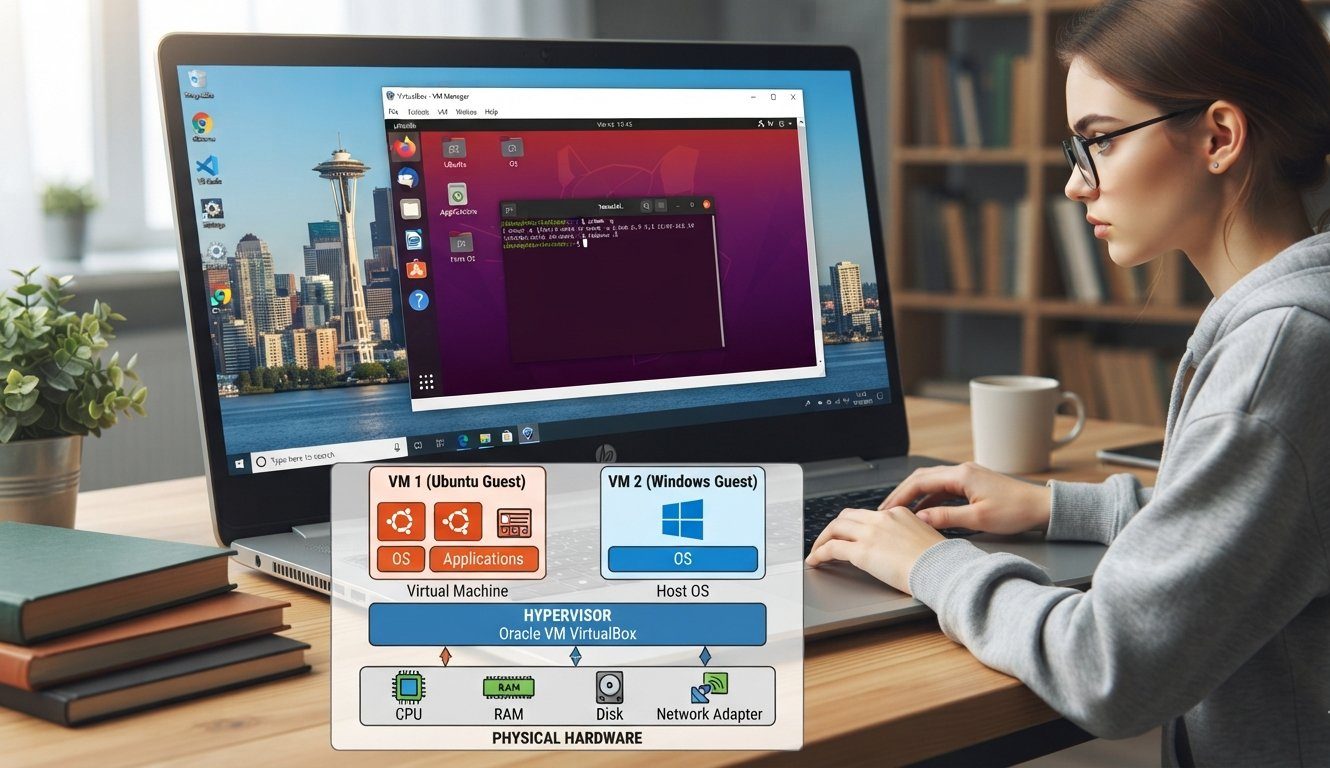
A VM or Virtual Machine is a environment created for software which acts separate PC. From a traditional machine it uses resources, meanwhile maintaining its own operating system i.e. guest and configuration of virtual hardware.
HYPERVISOR is the software for creating the atmosphere. It manages resources such as processing power, memory, storage, and networking so that multiple virtual systems can operate on the same physical computer.
Taking under consideration that a academic student needs Ubuntu or any OS for coding assessment but also uses windows. Thus installing such OS directly may demands for changing in existing windows one. In such cases a Virtual Machine creation allows both OS to run in separate environments without any changes.
Each virtual machine can have its own applications, files, system settings, and operating-system services.
Common Virtualization Software
Several tools are available for creating and managing virtual computers.
- Oracle VirtualBox: A popular option for personal use, learning, and operating-system experiments.
- VMware Workstation: A software on compatible desktop to run virtual operating systems.
- VMware ESXi: A software designed using Hypervisor only for utilization of server.
- Microsoft Hyper-V: A virtualization platform available in supported Windows environments.
Final choice or decision fully depends on the major or host operating system, capabilities of hardware system and workload.
What Happens When a Virtual Machine Starts?
When you start a virtual machine, the virtualization software allocates its configured resources and begins booting the guest operating system. The operating system then initializes its services before applications become available.
This process resembles starting a physical computer, although the hardware is virtualized.
A Virtual Machine is therefore useful when you need a separate operating system or want to test changes without directly modifying your primary environment.
Getting to Know Docker
Docker is known as a platform for creating along with running containers. An application with libraries, files, components of runtime needed to make deployment consistent across systems, all the matter is packed in application thus container.
Imagine that a developer builds a small website requiring a particular version of Python and several additional libraries. Installing these components manually on every computer can lead to differences between development and production environments.
Defining the application atmosphere in an image by developer is allowed by docker. Then a container being created from the created image, the application needs to run whenever it to be.
Not like a traditional VM, a Docker Container can not usually consists of different guest OS Kernel. It uses the host kernel while isolating application processes and other resources.
Docker Images and Containers are not the Same
These two terms are related but describe different things.
Docker image: A package of template which consists of filesystem layers and configuration of an application.
Docker container: An instance created from an image. Start, Stop, Restart and Remove operations can be performed on it.
In Instance, to create various running containers, one web application image is used. Each instance can handle a different portion of the workload, depending on how the application is configured.
Where Is Docker Commonly Used?
Docker is frequently used for:
- Running web applications and APIs.
- Testing software in automated pipelines.
- Packaging applications with their dependencies.
- Developing microservices.
- Deploying applications across compatible servers.
- Creating temporary environments for development and testing.
The ability to distribute environment of an application without any repetition of installing and configuring process of same dependence is the major advantage.
How Virtual Machines and Containers Are Built
The internal design of these technologies explains why they behave differently.
How a Virtual Machine Is Structured
A Hypervisor is placed between the guest environments and physical hardware system by a virtual system. Each and every VM receives virtual hardware system and run operating system of its own.
The general arrangement is:
Physical computer → Hypervisor → Guest operating system → Applications
Different operating systems hosted by the same physical server, because the kernel is being maintained by each guest system.
How Docker Containers Are Structured
Containers use the host operating system’s kernel instead of starting a separate kernel for every application instance.
Their general arrangement is:
Physical computer → Host operating system → Container runtime → Application containers
This design removes the need to boot a complete guest operating system for every container. However, containers still require computing resources, and their isolation depends on the host kernel and runtime configuration.
The Key Differences Between a Virtual Machine and a Docker
1. Purpose and Design
A VM is intended to service a completely virtual computer. It can run an operating system, system services, and applications within its own guest environment.
Docker focuses on application packaging and execution. Without creating a complete virtual computer for each application, a repeatable way to run the software device is provided by docker.
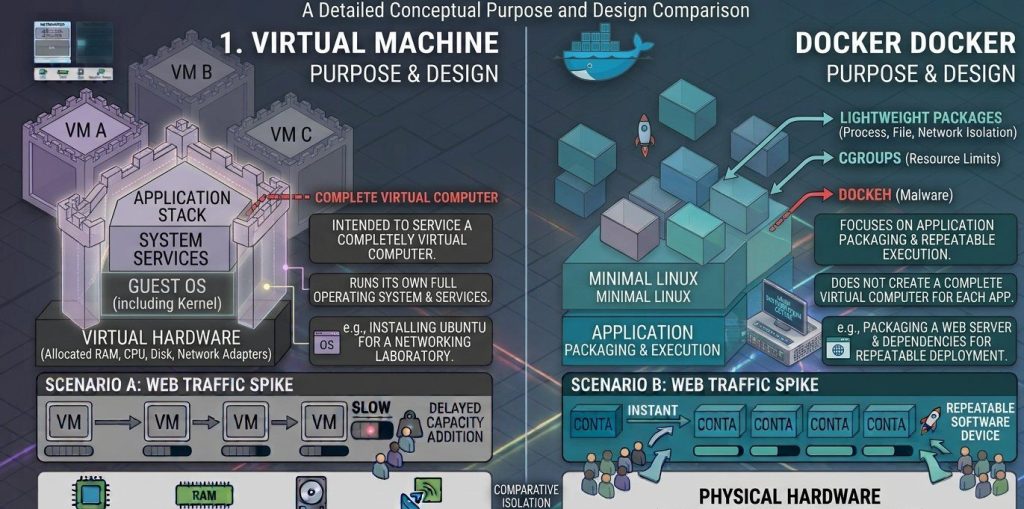
For example, a suitable use of a virtual machine includes installing Ubuntu for a networking laboratory. Dependencies for deployment and packaging of a web server is an example of typical docker use case.
2. Operating System Requirements
A virtual machine includes a guest operating system. This makes it possible to run a supported operating system that differs from the host system.
Containers share a compatible host kernel. As a result, a Linux container cannot directly use a Windows kernel, or vice versa. Docker Desktop can run Linux containers on Windows or macOS by using a Linux virtual machine or another supported virtualization environment.
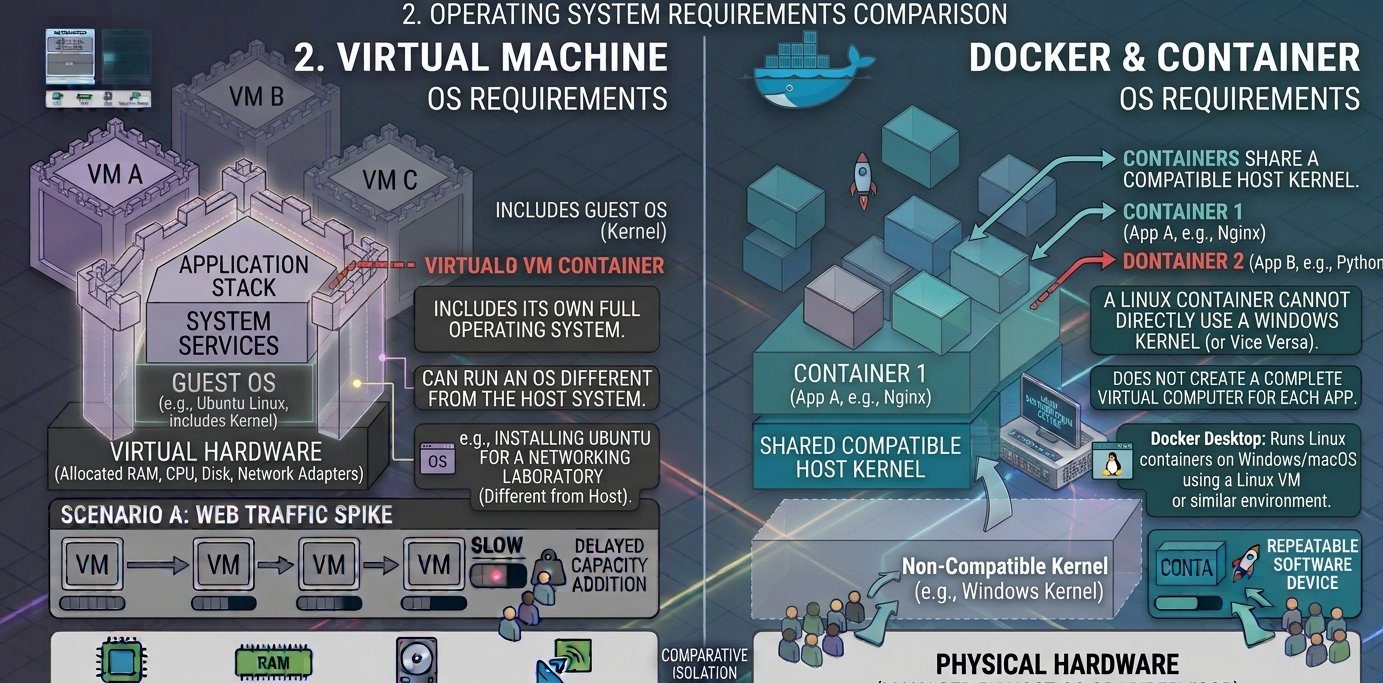
This distinction matters when an application requires particular operating-system features.
3. Memory and Storage
A Virtual Machine needs memory for its guest operating system and running applications. Its virtual disk may also contain the complete guest OS, system utilities, and application files.
Docker containers generally require less additional storage and memory because they do not each need a complete operating system. Images can also share common filesystem layers.
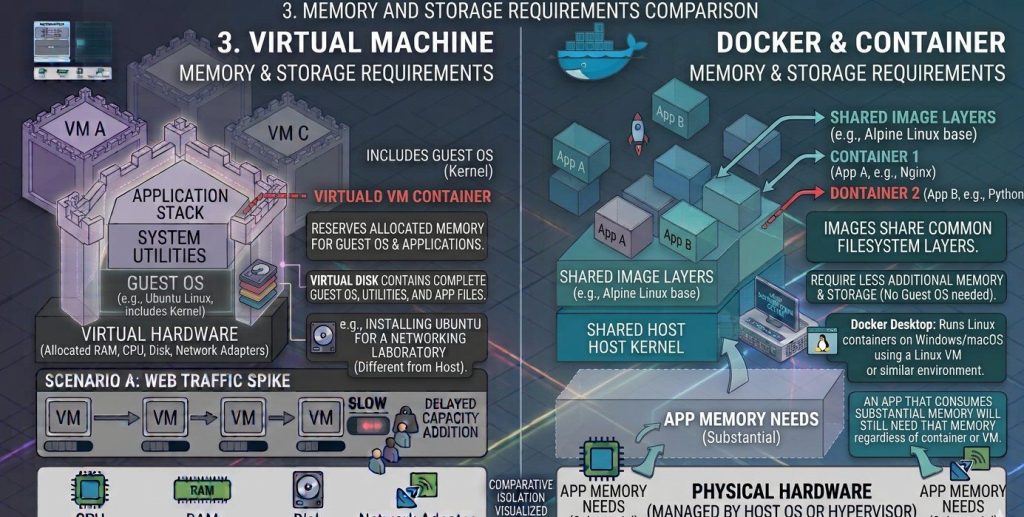
Nevertheless, an application that consumes substantial memory will still need that memory regardless of whether it runs in a container or virtual machine.
4. Startup Process
Starting a virtual machine involves initializing its virtual hardware and booting the guest operating system. The application may then need to wait for additional services to start.
A container generally skips this full operating-system boot process. Once the required image is available, the container runtime starts the application process.
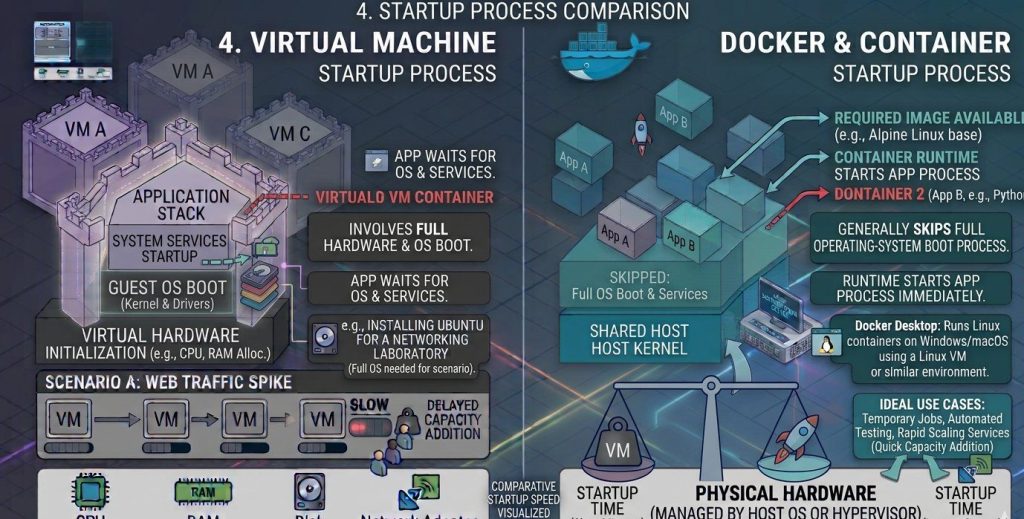
This makes containers convenient for temporary jobs, automated testing, and services that need to create additional instances quickly.
5. Performance
Containers usually have less overhead than conventional virtual machines because they share the host kernel. For many applications, their execution performance can be close to native performance.
Virtual machines introduce a virtualization layer and maintain a guest operating system. Modern hypervisors can nevertheless deliver excellent performance, so the difference depends on the workload and system configuration.
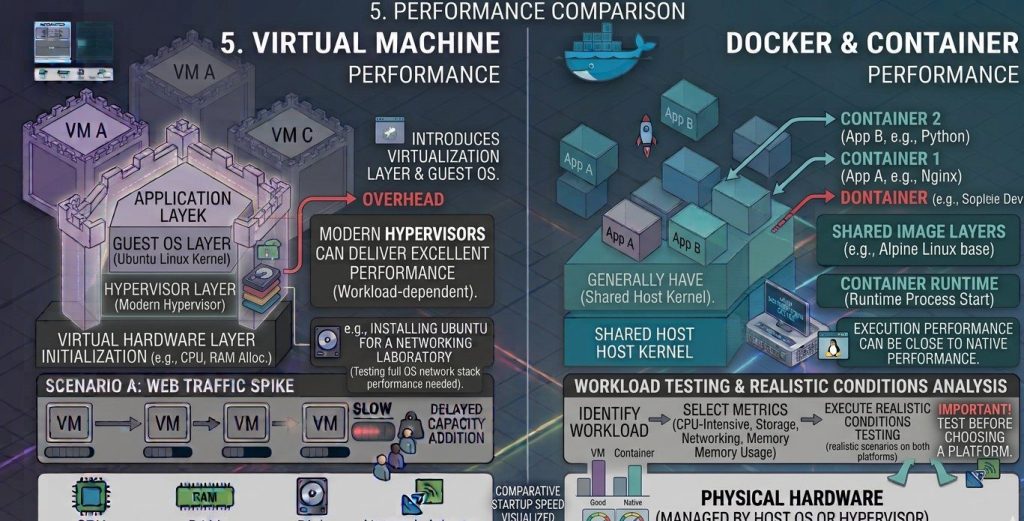
CPU-intensive calculations, storage operations, networking, and memory usage should be tested under realistic conditions before choosing a platform.
6. Isolation and Protection
A virtual machine has a separate guest operating system and kernel. The hypervisor creates a boundary between the guest environment and the underlying host.
Docker containers isolate application processes, filesystems, and resources, but ordinarily share the host kernel. A vulnerability in that shared kernel may create risks for multiple containers.
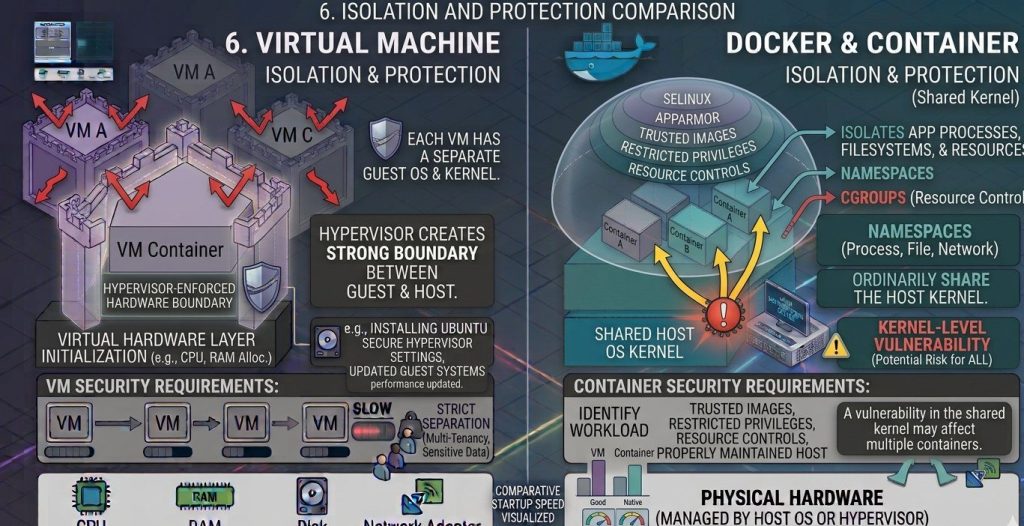
Neither approach is automatically secure. Virtual machines require secure hypervisor settings and updated guest systems. Container deployments need trusted images, restricted privileges, appropriate resource controls, and a properly maintained host.
For workloads with strict separation requirements, virtual machines may provide a useful additional security boundary.
7. Application Distribution
Docker makes it possible to distribute an application image containing its required software environment. A compatible server can use that image to create a container without manually repeating every installation step.
A virtual machine can also be distributed as an image or exported appliance. However, the package usually includes the guest operating system and virtual disk contents, which may increase its size.
Both technologies support portability, but the compatibility requirements differ.
8. Scaling and Administration
A Virtual Machine can be scaled by changing its resource allocation or creating additional virtual machines. This approach works well for infrastructure that needs separate operating-system environments.
Docker allows multiple application instances to be created from the same image. Container orchestration tools can automate their placement, replacement, networking, and scaling.
Container management becomes more complex when an application contains many interconnected services. Virtual machines also require administration, particularly when many guest operating systems need updates and monitoring.
9. Flexiblity
A virtual machine provides flexibility at the operating-system level. Users can install system packages, modify OS settings, and run supported applications that require different kernels.
Docker provides flexibility at the application level. Developers can package different application dependencies and deploy services independently, as long as they are compatible with the host environment.
The choice depends on whether the main requirement is a complete system or a consistent application environment.
Pros and Cons of Virtual Machines
A Virtual Machine provides several benefits, but it also introduces overhead.
Advantages
- Operating system freedom: Run different supported guest operating systems on one physical computer.
- Separate system environments: Maintain independent OS configurations for different workloads.
- Useful for education: Practice Linux installation, networking, and system administration without replacing your main OS.
- Legacy application support: Preserve software environments that depend on older operating systems.
- Infrastructure consolidation: Run several virtual servers on shared physical hardware.
Disadvantages
- Additional resource usage: Each guest operating system consumes memory and storage.
- Longer startup: The guest operating system must boot before the application is ready.
- Maintenance requirements: Guest systems need security patches and software updates.
- Disk space: Virtual disk images can become large.
- Configuration overhead: Managing numerous virtual systems requires careful resource allocation and monitoring.
Pros and Cons of Docker
Docker simplifies application deployment, although containers introduce their own responsibilities.
Advantages
- Reusable application images: Package an application environment for repeated deployment.
- Efficient resource usage: Avoid the need for a separate guest OS for every container.
- Convenient testing: Create isolated environments for automated tests and remove them afterward.
- Repeatable deployments: Use the same image across compatible development and production environments.
- Flexible scaling: Create additional application instances when demand increases.
Disadvantages
- Kernel dependency: Containers generally require a compatible host operating system.
- Security risks: Excessive privileges or vulnerable images can expose applications.
- Data management: Persistent files need appropriate volumes or external storage.
- Networking configuration: Multiple services may require additional networking and service discovery.
- Learning requirements: Larger deployments may need orchestration, monitoring, and container security practices.
Real-World Applications
Understanding practical examples can make the difference between these technologies easier to recognize.
Example 1: Learning Ubuntu on a Windows Laptop
Suppose you need to practise Linux commands for an academic assignment. You want to install packages, configure system services, and explore the Ubuntu desktop.
A Virtual Machine is appropriate because it provides a complete Ubuntu environment while allowing Windows to remain installed on the laptop.
Example 2: Deploying a Website
Suppose a developer has completed a website that requires a particular runtime and several libraries. The same application needs to run on a testing server and a production server.
Docker can package the application and its dependencies into an image, helping both environments use a consistent software configuration.
Example 3: Testing Different Operating Systems
A software testing team may need to check how an application behaves on several operating systems. Virtual machines are useful because each guest can maintain its own OS version and system settings.
Example 4: Running Multiple Application Services
A company may operate a website, a background processing service, and an API. Docker containers can package these components separately, allowing each service to be deployed and updated independently.
Example 5: Combining Both Technologies
An organization can create Linux virtual machines on a physical server and install Docker inside them. The VMs separate infrastructure environments, while Docker manages the applications running within each guest.
This combined design is common in cloud infrastructure because the two technologies serve different purposes.
Which Technology Should You Choose?
The right choice depends on the problem you are trying to solve.
Choose a Virtual Machine when you need to:
- Install a complete operating system.
- Test a different kernel or operating-system configuration.
- Run applications that depend on specific guest OS settings.
- Create separate virtual servers.
- Learn operating-system installation and administration.
Choose Docker when you need to:
- Package an application and its dependencies.
- Reproduce software environments across compatible systems.
- Run automated application tests.
- Deploy web services and microservices.
- Create or replace application instances efficiently.
For students learning computer systems, a virtual machine is often a convenient starting point for understanding operating systems. For developers working on repeatable application deployment, Docker offers a practical container-based workflow.
Neither technology is universally superior. The best solution is the one that meets the application’s compatibility, performance, security, and maintenance requirements.
Frequently Asked Questions
1. What is a Virtual Machine in simple terms?
A Virtual Machine is a software-based computer that runs an operating system using virtual hardware supplied by a hypervisor. It allows users to operate a separate system without needing another physical computer.
2. Why is Docker different from a Virtual Machine?
Docker packages and runs applications in isolated containers that generally share the host kernel. A virtual machine runs its own guest operating system, which usually increases its resource requirements.
3. Can I use Docker without a Virtual Machine?
Yes. Docker can run on a compatible Linux host without requiring a separate virtual machine for its containers. On Windows and macOS, Docker’s Linux container environment commonly relies on virtualization behind the scenes.
4. Which technology is easier for beginners?
A Virtual Machine may be easier when your goal is to install and explore an operating system such as Ubuntu. Docker may be easier once you understand application dependencies and want to package software for deployment.
5. Does a Virtual Machine need an internet connection?
No. A virtual machine can run without an internet connection once the operating system and required software are installed. Internet access is needed only for tasks such as downloading packages, browsing websites, or connecting to online services.
6. Can Docker containers run on a virtual machine?
Yes. Docker can be installed inside a compatible guest operating system, allowing multiple containers to run within a virtual machine. This combines virtualized infrastructure with container-based application deployment.
7. What is the main difference between a Docker container and a Virtual Machine?
The main difference is that a Docker container shares the host operating system’s kernel, while a Virtual Machine runs its own operating system through a hypervisor. Containers are generally lightweight and start faster, whereas Virtual Machines provide stronger isolation between operating systems.
8. Is a Virtual Machine better than Docker containers?
A Virtual Machine is better when you need to run different operating systems, isolate entire environments, or test operating-system-level configurations. Docker containers are more suitable for lightweight application deployment, faster startup, and efficient resource utilization.
9. Can Docker run inside a Virtual Machine?
Yes, Docker can run inside a Virtual Machine. This setup allows developers to use containers within an isolated virtual environment, combining the flexibility of virtualization with the efficiency of containerization.
10. Which uses more resources: Docker containers or a Virtual Machine?
A Virtual Machine generally uses more memory, storage, and processing resources because it runs a complete guest operating system. Docker containers typically consume fewer resources because they share the host operating system’s kernel, making them efficient for running multiple applications.
Conclusion
A Virtual Machine creates a complete virtual computer, making it useful for operating-system experimentation, software compatibility testing, and infrastructure separation. Docker takes a different approach by packaging applications into containers that can run in compatible environments without requiring a separate guest operating system for each instance.
The distinction is important because the two technologies address different needs. Virtual machines focus on providing independent operating-system environments, while Docker focuses on simplifying application packaging and deployment.
Once you understand the requirements of your application, selecting between these technologies—or combining them—becomes much easier.
Discover more from Root Learning
Subscribe to get the latest posts sent to your email.