Every time you start a Linux laptop, open a website hosted on a Linux server, or tap an Android app, one quiet piece of software is doing the hardest work in the background. It decides which program gets the processor, where data sits in memory, and how your keyboard, screen, and network card talk to the rest of the system. That software is the Linux kernel.
Many beginners use the words “Linux” and “kernel” as if they mean the same thing. They do not. The Linux kernel is the core of the system, while a full Linux operating system also includes tools, libraries, a desktop, and applications.
In this guide, you will learn what the Linux kernel is, what it does, and how it is built. You will see 7 simple facts, a plain-language look at its main parts, how it compares with other kernels, and how versions and updates work. Everything is explained in simple words, so you only need to read along. No commands have to be run on your system.
Table of Contents
What Is the Linux Kernel?
The Linux kernel is the central program of a Linux system. It sits between the hardware, such as the processor, memory, disks, and network cards, and the software that you use every day, such as browsers, editors, and games.
Think of it as the manager of a busy restaurant. The customers (your applications) place orders, but they do not walk into the kitchen. The manager (the kernel) takes each request, decides who gets served first, makes sure the kitchen (the hardware) is not overloaded, and keeps one customer from interfering with another.
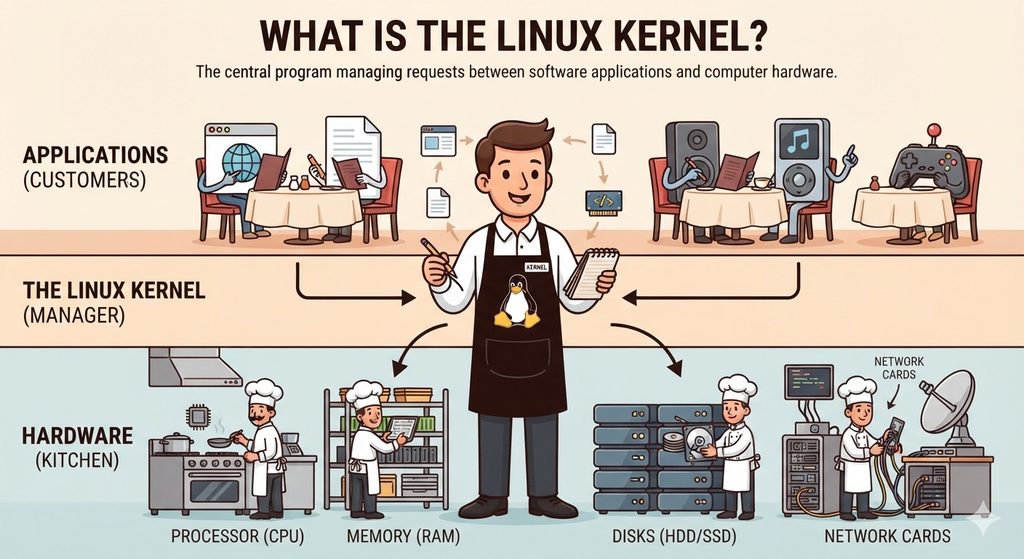
Without the kernel, applications would have to control hardware directly, and every program would need to know how to work with every type of device. The kernel removes that problem by offering one clear, consistent way for software to use the machine.
Fact 1: The Linux Kernel Is the Core, Not the Whole Operating System
The first thing to understand is that Linux, strictly speaking, is only the kernel. A complete operating system needs much more:
- System libraries and core tools
- A shell and command-line utilities
- Software for starting and managing services
- A desktop environment or server software
- Applications
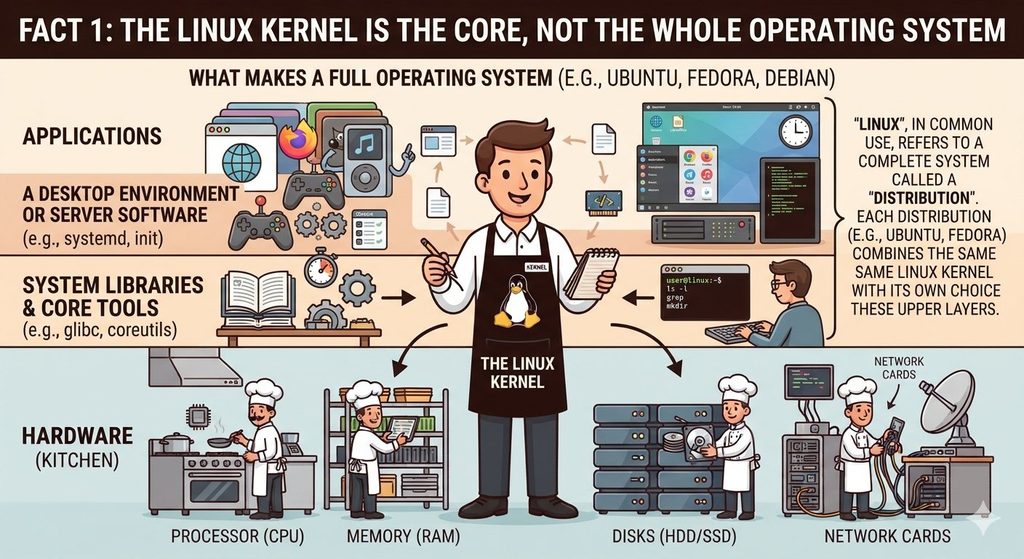
When people say “Linux”, they usually mean a full system built around the Linux kernel, such as Ubuntu, Fedora, or Debian. Those systems are called distributions. Each one combines the same kind of kernel with its own choice of tools and software.
This is why two distributions can look and feel very different but still share the same Linux kernel underneath.
Fact 2: One Student Project Started It All
The story of the Linux kernel began in 1991, when a Finnish student named Linus Torvalds started writing a small operating system kernel as a personal hobby. He shared it online and invited other people to try it and help improve it.
Others joined in, and the project grew quickly. Torvalds released the code under an open-source license, which means that anyone can read, change, and share it, as long as they follow the license rules. Today, the Linux kernel is one of the largest and most successful open-source projects in history.
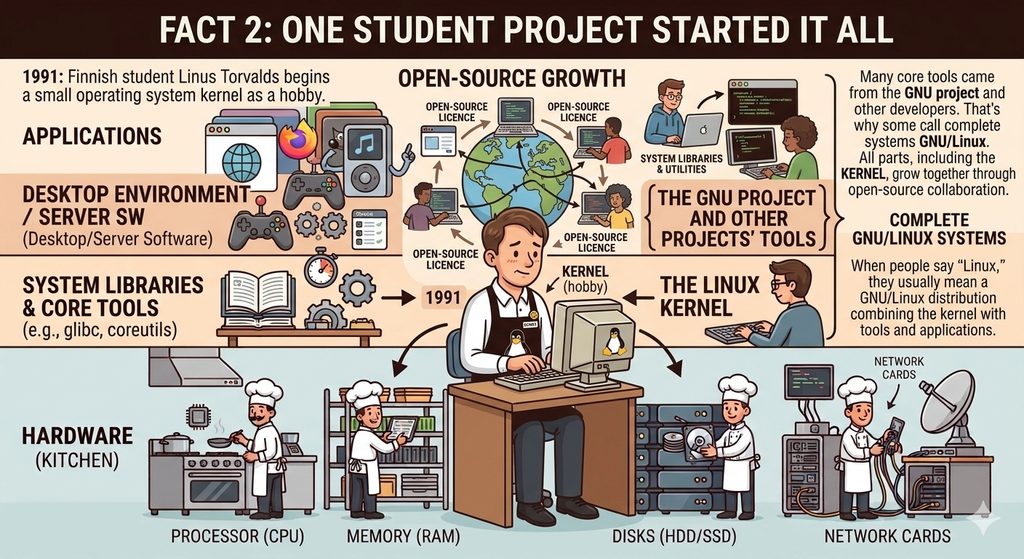
It is worth remembering that Torvalds created the kernel, not the entire set of Linux tools. Many of those tools came from the GNU project and from other developers, which is why some people prefer the name GNU/Linux for complete systems.
Fact 3: It Manages Your Processor, Memory, and Devices
The Linux kernel has several big responsibilities. Each one is handled by a different part of the code, and all of them work together all the time.
- Process management: the kernel decides which program runs on the processor and for how long. This is called scheduling. It switches between programs so quickly that many seem to run at the same time.
- Memory management: it gives each program its own space in memory, keeps programs from reading each other’s data, and moves unused data to disk when memory runs low.
- Device management: it uses small programs called drivers to communicate with hardware such as keyboards, graphics cards, printers, and storage drives.
- File system management: it controls how data is stored, named, found, and protected on disks.
- Networking: it sends and receives data across networks, using the rules known as protocols.
- Security and permissions: it checks who is allowed to do what, so that users and programs stay within their limits.
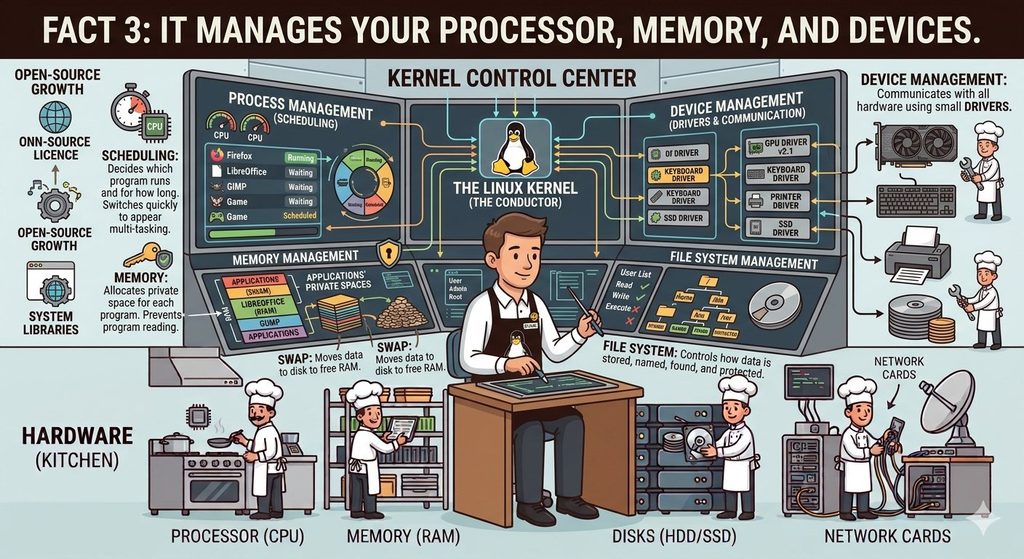
All of this happens in the background, often thousands of times per second, without you noticing.
Fact 4: Kernel Space and User Space Keep the System Safe
The Linux kernel divides a running system into two areas.
- Kernel space: a protected area where the kernel runs with full control of the hardware.
- User space: the area where ordinary programs run with limited rights.
This separation is a major safety feature. If a normal application crashes, it usually affects only itself and not the whole computer. A user program also cannot damage hardware directly or read the memory of other programs.
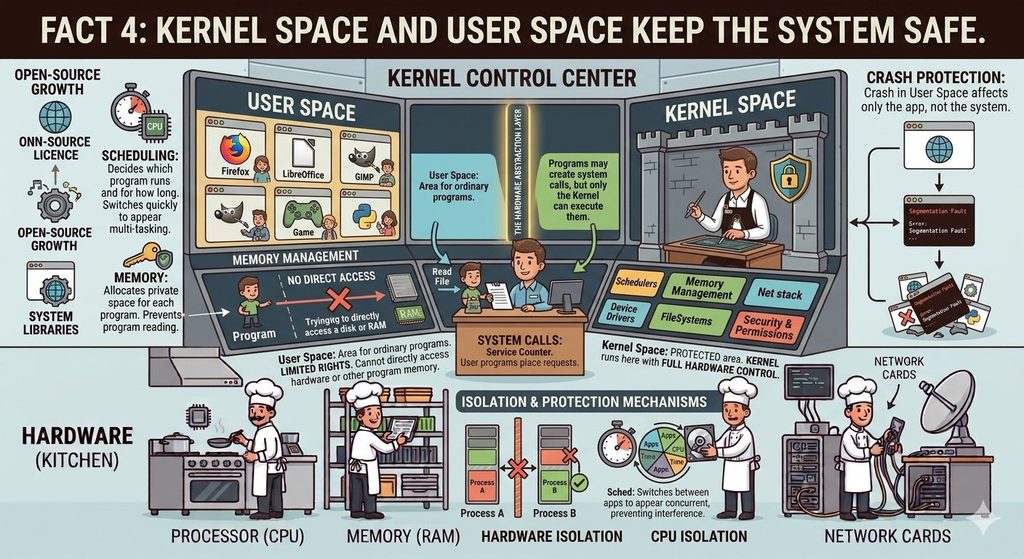
When an application needs something from the system, such as reading a file or sending data over the network, it makes a request called a system call. The kernel checks the request, performs the task if it is allowed, and returns the result. System calls act like a service counter: programs may ask for help, but they cannot walk behind the counter.
Fact 5: It Is Monolithic but Modular
Kernel designers use different approaches. A monolithic kernel runs most of its core services together in one large program in kernel space. A microkernel keeps only a very small core in kernel space and runs most services outside it.
The Linux kernel is monolithic, which helps it perform quickly because its parts can communicate directly. However, it is also modular. Features such as many device drivers and file systems are built as kernel modules, which can be loaded when needed and removed when not needed.
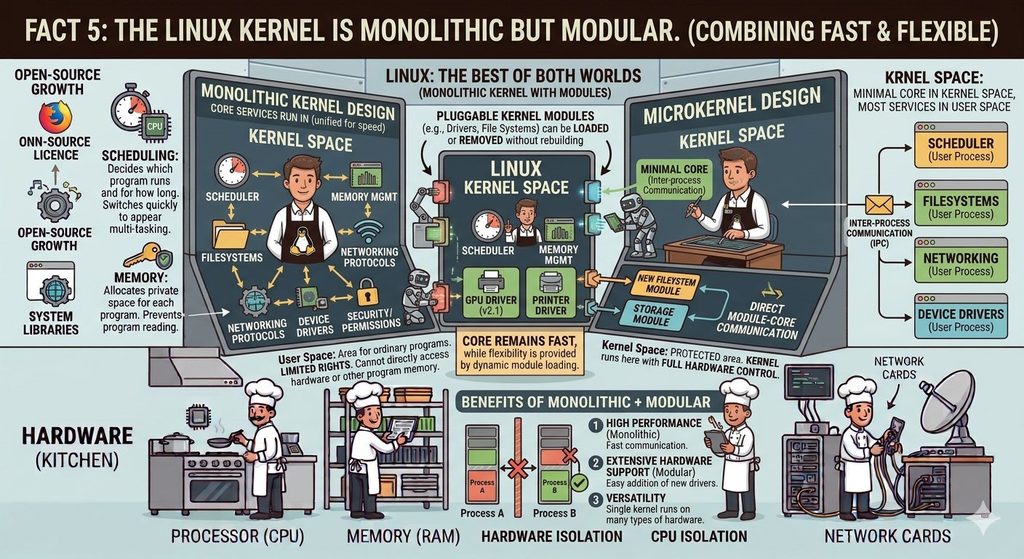
This combination gives the best of both worlds. The core stays fast, while support for new hardware or features can be added without rebuilding the entire kernel. It is also the reason a single Linux kernel can run on a wide variety of machines.
Fact 6: It Powers Almost Everything, From Phones to Supercomputers
The Linux kernel runs in far more places than most people realise:
- Smartphones: Android is built on the Linux kernel.
- Servers and websites: a large share of the web runs on Linux servers.
- Cloud computing: most cloud platforms use Linux for their virtual machines and containers.
- Supercomputers: the world’s fastest supercomputers run Linux.
- Home devices: routers, smart TVs, set-top boxes, and many smart home gadgets.
- Vehicles and industry: car infotainment systems, factory machines, and medical equipment.
- Desktops and laptops: a growing number of personal computers run Linux distributions.
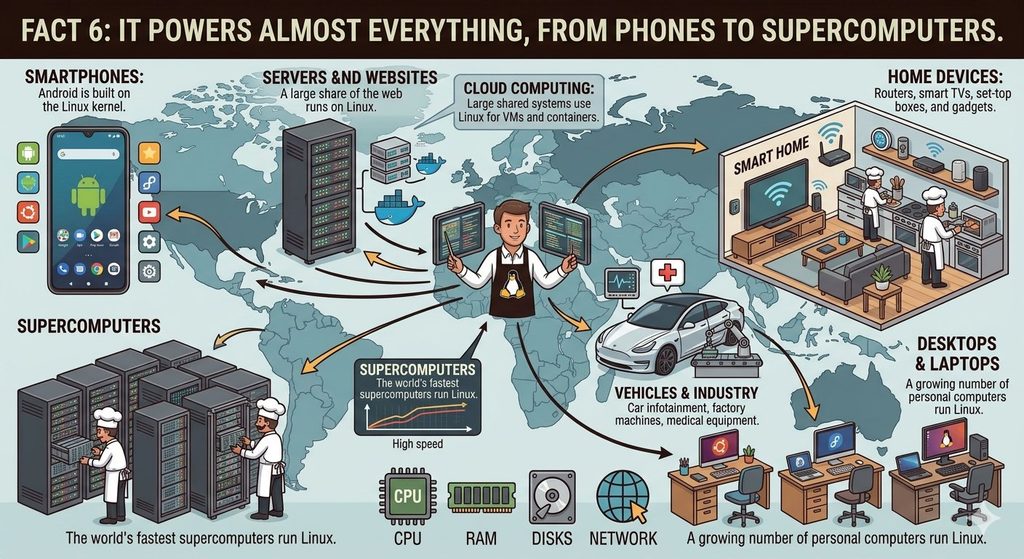
The kernel’s flexibility is a major reason for this success. The same core code can be adjusted to fit a tiny embedded chip or a giant data centre.
Fact 7: Thousands of People Build It Together
The Linux kernel is not written by one company. Thousands of developers from around the world contribute, including individual volunteers and engineers from large technology companies.
The process works like this:
- Developers write changes, such as fixes, new drivers, or performance improvements.
- Subsystem maintainers, who look after specific areas, review the changes.
- Approved changes move upward and are collected for each new release.
- Linus Torvalds and senior maintainers take care of the final steps of releasing the kernel.
A new version of the kernel is released after a few months, and each one contains thousands of changes. This open and public process is one reason the kernel is trusted: many people can read the code, report problems, and fix them quickly.
Main Parts of the Linux Kernel
The kernel is large, but its design can be understood through a few main parts:
| Part | What it does |
|---|---|
| Process scheduler | Decides which task uses the processor and when |
| Memory manager | Allocates and protects memory, including virtual memory |
| Virtual file system (VFS) | Gives programs one common way to work with many file system types |
| Device drivers | Let the kernel talk to hardware |
| Network stack | Handles network protocols and data transfer |
| Inter-process communication | Lets programs share data safely |
| System call interface | The entry point through which programs request services |
A helpful idea here is abstraction. Instead of requiring every program to know how each disk or network card works, the kernel offers a simple, standard view. A program can ask to “read a file” without caring whether it sits on a hard drive, a USB stick, or a network share.
Kernel vs Operating System vs Distribution
These three terms are often confused, so here is a simple comparison:
| Term | Meaning | Example |
|---|---|---|
| Kernel | The core program that manages hardware and resources | The Linux kernel |
| Operating system | The kernel plus the tools, libraries, and software that make a usable system | A complete Linux system |
| Distribution | A packaged version of the operating system with its own software choices and update tools | Ubuntu, Fedora, Debian |
An easy comparison is a car. The kernel is the engine, the operating system is the complete car, and the distribution is a specific model with its own design and features.
Linux Kernel vs Other Kernels
Other systems have their own kernels. Looking at them helps explain what makes the Linux kernel special.
- Windows NT kernel: used in Windows, it is described as a hybrid design that mixes ideas from both monolithic and microkernel approaches. It is closed source.
- XNU: used in macOS and iOS, it combines parts of a microkernel with Unix-style components. Parts of it are open source.
- BSD kernels: used in FreeBSD and similar systems, they are also Unix-like and open source, but they are developed as separate complete systems.
What sets the Linux kernel apart is its open development, its huge hardware support, and its use across so many areas, from phones to cloud servers. It is free to use and modify, which has encouraged a large ecosystem of distributions and products.
Linux Kernel Versions and Updates
The Linux kernel is updated regularly. A new main version arrives roughly every two to three months, adding new features, hardware support, and performance improvements. Version numbers increase over time, and the official site for the project lists the current ones.
Two ideas are useful for beginners:
- Stable releases: the latest versions, which contain the newest features and fixes.
- Long-term support (LTS) releases: versions that receive bug and security fixes for several years, which is why servers and many distributions prefer them.
Distributions usually choose a kernel version, test it with their software, and add their own fixes, then deliver it to users as part of normal updates. This is why different distributions may run different kernel versions at the same time.
Updating the Linux kernel matters because new versions can add support for newer hardware, improve speed, and close security gaps. Most users receive these updates automatically through their distribution.
Why the Linux Kernel Matters for Security
Because the kernel controls everything, its security is vital. A weakness at this level can affect the entire system, so the kernel contains many protective features:
- User and permission checks: the kernel decides who can read, write, or run files.
- Isolation between programs: memory protection stops one program from reading another’s data.
- Namespaces and control groups: they help isolate groups of processes and limit the resources they can use. They are the building blocks behind containers.
- Security modules: frameworks such as SELinux and AppArmor add extra rules about what programs may do.
- Regular patches: security fixes are released quickly once problems are found, and LTS versions continue to receive them.
No software is perfect, so keeping the kernel updated is one of the most important habits for any Linux user or administrator.
Common Misunderstandings About the Linux Kernel
- “Linux and the Linux kernel are exactly the same.” The kernel is the core, and a full system adds many more parts.
- “The kernel is the same on every Linux system.” Versions, settings, and added features differ between distributions.
- “Only experts need to understand the kernel.” Basic knowledge helps beginners understand updates, drivers, and system behaviour.
- “Open source means unsafe.” Open code can be reviewed by many people, which often helps find and fix problems faster.
- “The kernel is just for servers.” It also runs phones, TVs, routers, and desktops.
- “The kernel includes the desktop.” The desktop environment is separate software that runs on top.
Conclusion
The Linux kernel is the quiet foundation of the Linux world. It manages the processor, memory, devices, files, and networks, protects the system through kernel space and user space, and stays flexible through its modular design. Started as a student’s hobby in 1991, it is now developed by thousands of contributors and runs everything from phones and routers to cloud servers and supercomputers.
Remember the simple picture: the kernel is the manager that stands between your software and your hardware. Once you understand that idea, topics such as drivers, updates, containers, and system security become much easier to follow. Whether you are a student, a developer, or a future system administrator, knowing how the Linux kernel works is one of the best foundations you can build.
Frequently Asked Questions (FAQs)
1. What is the Linux kernel?
The Linux kernel is the core program of a Linux system. It manages the processor, memory, devices, files, and networking, and it lets applications use the hardware safely and efficiently.
2. Who created the Linux kernel?
Linus Torvalds, a Finnish student at the time, started the Linux kernel in 1991 as a personal project. It is now developed by thousands of contributors around the world.
3. Is Linux an operating system or a kernel?
Strictly speaking, Linux is the kernel. A complete operating system, such as Ubuntu or Fedora, combines the Linux kernel with libraries, tools, and applications.
4. What does the Linux kernel do?
It manages processes, memory, hardware devices, file systems, networking, and security. It also provides system calls so that programs can request services from the system.
5. What is the difference between kernel space and user space?
Kernel space is the protected area where the kernel runs with full hardware control. User space is where ordinary applications run with limited rights. This separation helps keep the system stable and secure.
6. Is the Linux kernel monolithic or a microkernel?
The Linux kernel is monolithic, meaning most core services run together in kernel space. It is also modular, since many drivers and features can be loaded and removed as kernel modules.
7. What are kernel modules?
Kernel modules are pieces of code, such as device drivers or file system support, that can be loaded into the kernel when needed and unloaded when not needed. This keeps the core kernel smaller and flexible.
8. What is an LTS Linux kernel?
An LTS, or long-term support, kernel is a version that receives bug and security fixes for several years. Servers and many distributions prefer LTS versions because they are stable and well supported.
9. Where is the Linux kernel used?
It is used in Android phones, web servers, cloud platforms, supercomputers, routers, smart TVs, cars, and desktop computers running Linux distributions.
10. Why is it important to keep the Linux kernel updated?
Updates add support for new hardware, improve performance, and fix security problems. Because the kernel controls the whole system, an outdated version can leave important weaknesses open.
Discover more from Root Learning
Subscribe to get the latest posts sent to your email.