AlmaLinux OS with a LAMP stack is a really good duo. AlmaLinux, in 2026, is one of the most attractive choices. This OS is popular for server environments because it provides a RHEL-compatible foundation while offering long-term stability.
Downloading LAMP on AlmaLinux OS is quite important. LAMP stands for Linux, Apache, MariaDB, & PHP—4 technologies that have powered countless sites & various web applications for years
Table of Contents
Why Go for AlmaLinux OS for LAMP in 2026?
AlmaLinux’s latest version is known to support multiple architectures. It’s easy to use, cost affective and does not require much free space of your disk. Over the years, AlmaLinux Operating System has gained the trust of various developers, hosting providers, & businesses.
AlmaLinux OS is designed to provide an enterprise-oriented Linux environment with very strong compatibility with the RHEL ecosystem.
Terminology Used in the Terminal for Installing the LAMP Stack on AlmaLinux OS
The terminology used for downloading LAMP on AlmaLinux is different from usual commands. The differenece is there because we are working on Linux commands, PHP, Apache, MariaDB, etc. Let’s look at these terms:
| Term | What it means | Example |
|---|---|---|
| LAMP | Linux + Apache + MariaDB + PHP | Complete web stack |
| Apache | Web server that delivers websites | httpd |
| AlmaLinux | Linux operating system used as the server platform | AlmaLinux 9/10 |
| HTTPD | AlmaLinux package/service name for Apache | httpd.service |
| MariaDB | Relational database server | mariadb.service |
| PHP | Server-side scripting language | php -v |
| DNF | AlmaLinux package-management command | sudo dnf install php |
| PHP-FPM | PHP process manager commonly used with Apache | php-fpm |
Download the Complete Terminology PDF
Easy Installation Guide of LAMP stack on AlmaLinux OS server
To install LAMP, you will have to first install AlmaLinux OS. The steps are easy; you can also refer to the steps of installation of Zorin OS on VMware. The steps are mostly similar. Just give at least 4 GB of free space to this application. After installing the Alma Linux operating system, you can follow the steps given below to download the LAMP Stack:
Update AlmaLinux OS
Find the Terminal Option & open it. After that, start writing commands
- You should see something like:
YourName@localhost:~$- Then we will write a command to update AlmaLinux
The command will look like sudo dnf update -y. Then press Enter.
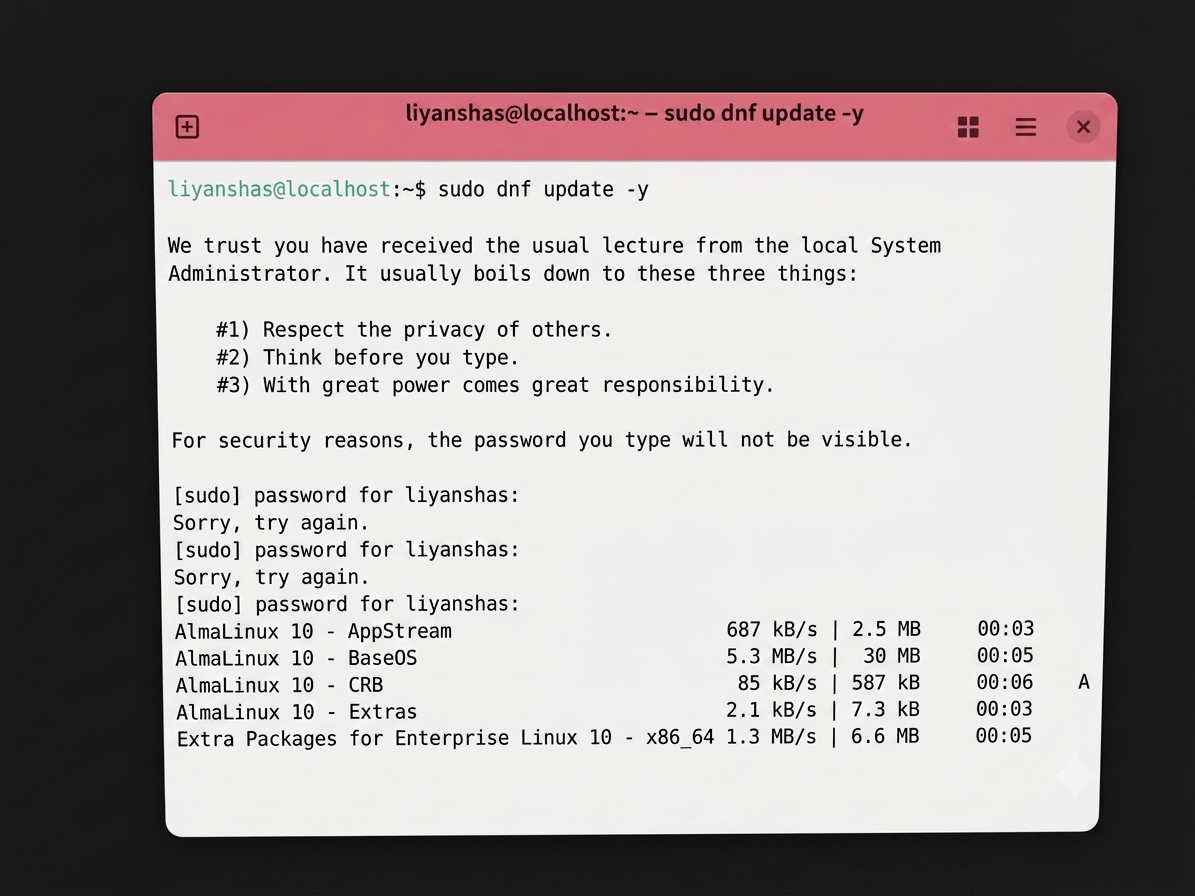
You will be asked to type your password as well. Type your AlmaLinux password & then move forward. You may not see anything written on the screen, as the password is kept hidden.
Let’s Begin Installing LAMP
Apache
First, we will install Apache and then test it.
- To install Apache, type the following and then press Enter:
sudo systemctl start httpdRemember: You have to type everything adjacent to YourName@localhost:~$
- The next step is to enable Apache, and for that, type the following:
sudo systemctl enable httpdThis makes Apache start automatically when AlmaLinux starts.
Then you’ll see lots of text such as:
Installing
Downloading
Running scriptlet
Complete!
- When the installation is finished, you should return to the following to check whether Apache is installed or not:
YourName@localhost:~$
- Type rpm -q httpd to check whether Apache is installed or not
- On the screen, if you see httpd-2.4.x-…, then Apache is installed.
- If you want to check if Apache is working or not, you can type the following:
sudo systemctl status httpd
Press Enter.
Look for:
Active: active (running)
If you see active (running), Apache is working.
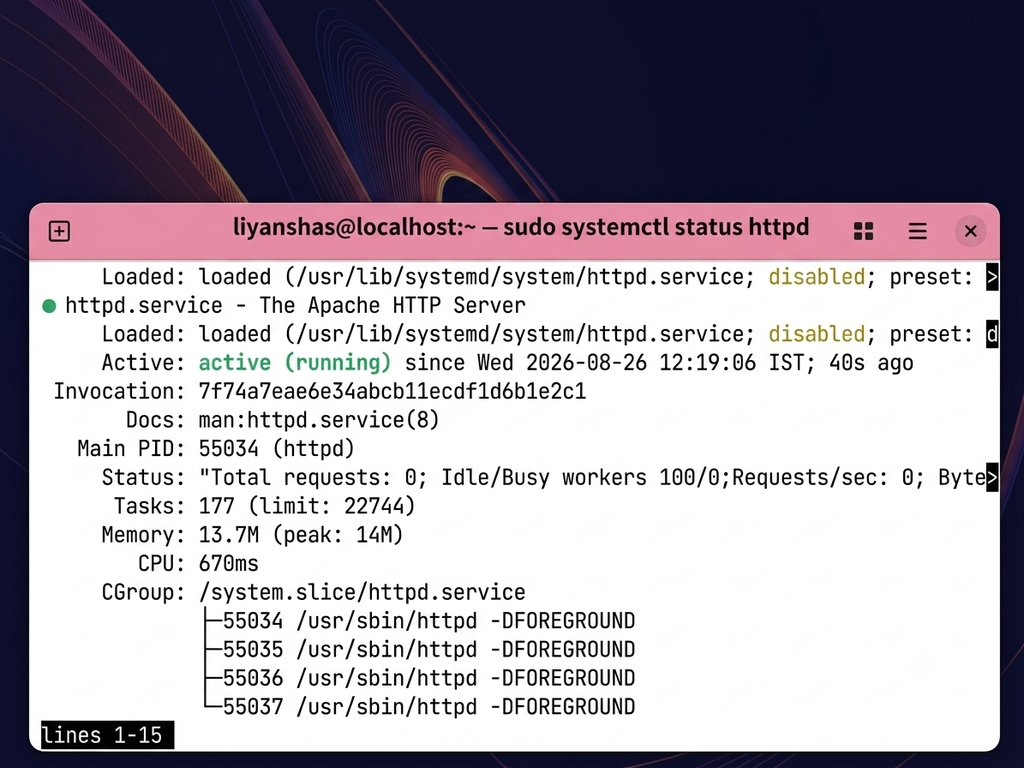
- Afterwards, this, Click anywhere inside the Terminal window.
- Press the Q key on your keyboard once to return to YourName@localhost:~$.
MariaDB
At the Terminal prompt:
YourName@localhost:~$Type only:
sudo dnf install mariadb-server- Wait for the installation to happen. You’ll see various messages about downloading & installing packages.
Type only:
sudo systemctl start mariadbPress Enter.
You may see nothing. That’s normal.
- Now we will check whether it is working, installed or not.
Type the following:
- sudo systemctl status mariadb.
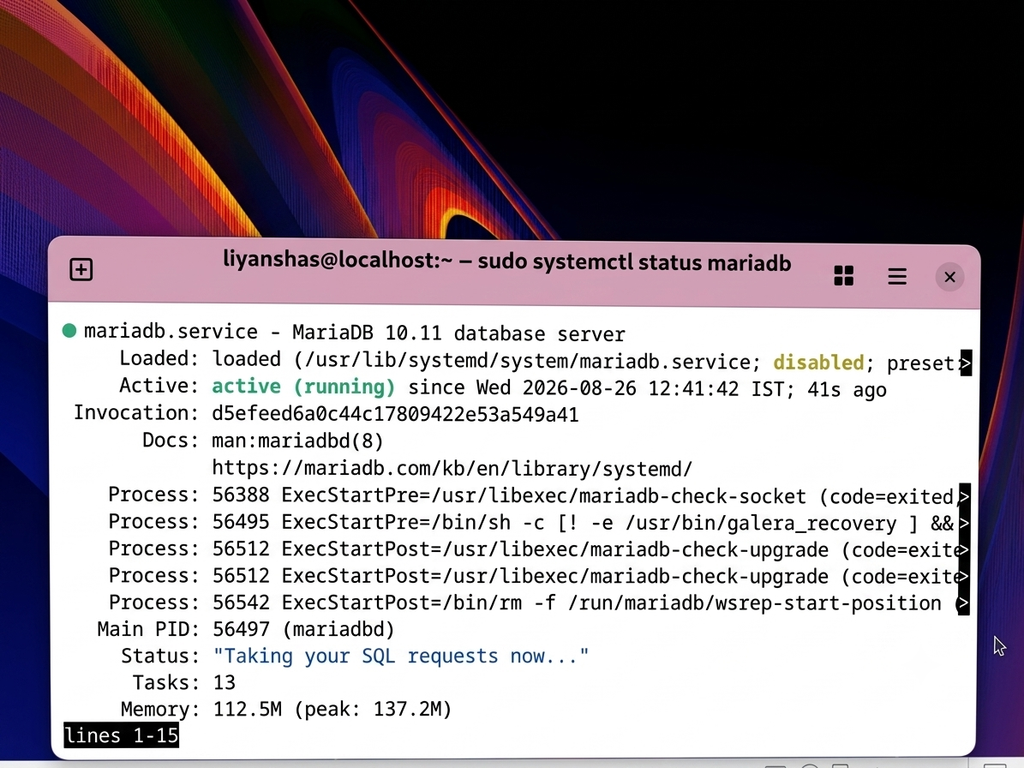
It must show Active
PHP
- To install PHP, type the following:
sudo dnf install php php-mysqlndThen, after pressing Enter, press Y and then press Enter again.
- The next step is to restart Apache
PHP requires Apache to reload so it can use PHP.
At:
YourName@localhost:~$
Type only:
sudo systemctl restart httpd
Press Enter.
You probably won’t see anything. That’s normal.
- Then, in the next step, we will check if PHP is working or not.
Now type php -v & then press Enter
You should see something like:
PHP 8.x.x
That confirms PHP is installed.
Test File
- Now we will create a test file to see whether everything is running smoothly or not. For that, see the instructions below:
- Type only:
sudo nano /var/www/html/info.php
- Type this inside Nano
<?php
phpinfo(); ?>
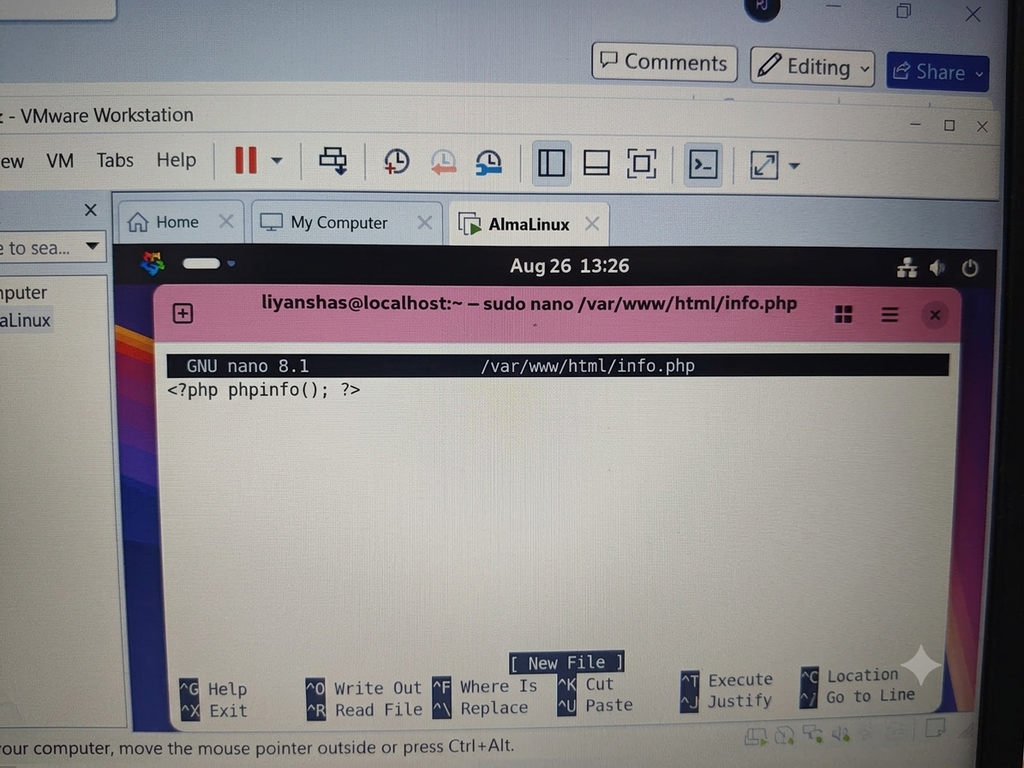
Click on Ctrl O
- The Nano will save you file
- Then close this terminal & go back to Firefox on the Alma Linux desktop.
- Go to the PHP test page
- Once Firefox opens, you’ll see an address bar near the top.
- Click inside the address bar and type:
http://localhost/info.php
If you see the PHP written that means everything is done.
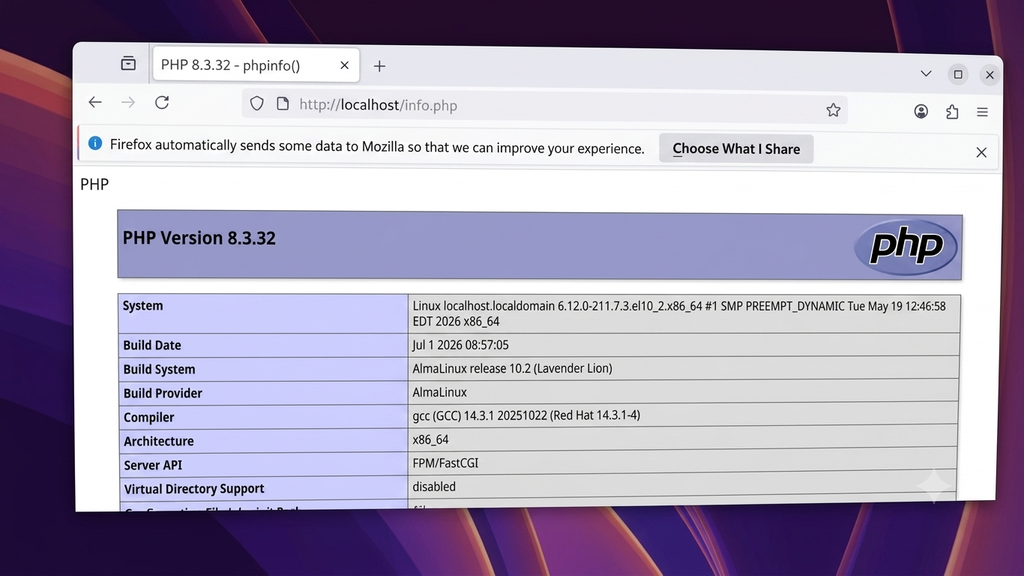
This is how you can download LAMP on AlmaLinux.
Why Install LAMP on AlmaLinux in 2026?
There are several reasons to consider AlmaLinux for a LAMP deployment. These reasons are given below:
2. Open-Source Technology
Apache, MariaDB, PHP, & AlmaLinux can be used without proprietary software licensing fees. This makes the LAMP stack attractive for personal projects, startups, developers, educational environments, and businesses.
1. Stable Server Foundation
AlmaLinux is designed for server & also enterprise workloads. Its compatibility with the RHEL ecosystem makes it familiar to administrators who work with enterprise Linux environments.
3. Flexible Hosting
A LAMP server can host everything from a simple PHP website to a database-driven application. You can also configure Apache Virtual Hosts to host multiple websites on one server.
4. Large Ecosystem
LAMP has been used for decades, so there is extensive documentation, community knowledge, development tooling, and application support available.
FAQs
Below are the FAQs related to LAMP Server Installation 2026 on AlmaLinux OS:
Q. What are the requirements to download LAMP Server on AlmaLinux?
A. The primary requirement to install a LAMP server on AlmaLinux is having a running instance of AlmaLinux (version 8 or 9) with root or sudo administrative privileges.
Q. What is the full form of LAMP?
A. The full form of LAMP is Linux, Apache, MariaDB, & PHP. Downloading these together makes it the LAMP Stack.
Q. Which is better, AlmaLinux OS or Ubuntu?
A. Neither AlmaLinux nor Ubuntu is universally better; AlmaLinux is better for enterprise stability & Red Hat (RHEL) compatibility, while Ubuntu is better for general desktop use, modern development, & various cloud-native tools.
Q. Which is better, Rocky Linux or AlmaLinux?
A. Neither of the two is best. It depends on the usage that the person is trying to achieve. If the usage is correct and if the OS fulfills your wishes, then that one is better.
Q. Is LAMP on AlmaLinux user-friendly?
A. Yes, LAMP on AlmaLinux is user-friendly. The installation steps are quite easy as well as its usage.
Discover more from Root Learning
Subscribe to get the latest posts sent to your email.