Explore Arch Linux vs Ubuntu in 2026 and discover key differences with confidence. Compare customization, stability, performance, and usability to choose the right Linux distribution for your needs.
Table of Contents
Introduction to Arch Linux vs Ubuntu
The debate of Arch Linux vs Ubuntu continues to be highly relevant in 2026. Both distributions have matured significantly, but they still represent two distinct philosophies in the Linux ecosystem.
- Arch Linux is a rolling‑release distribution that provides the latest software updates continuously. It follows the principle, giving users complete control over their system. This means you build your OS from the ground up, installing only what you need. The result is a lightweight, highly customizable system as it requires technical knowledge and careful maintenance.
- Ubuntu backed by Canonical, is known for its predictable release cycle and Long-Term Support (LTS) versions, which offer five years of security updates. It is designed for ease of use, making it ideal for beginners, enterprises, and cloud environments. Ubuntu’s guided installer, broad hardware support, and strong community make it one of the most accessible Linux distributions.
Choosing between Arch Linux and Ubuntu is not just about technical features where it reflects how users want to interact with their operating system:
- Control vs Convenience: Arch Linux gives you full control, while Ubuntu provides a system that works.
- Cutting‑Edge vs Stability: Arch Linux delivers the latest software instantly, whereas Ubuntu prioritizes stability and long‑term support.
- Audience: Arch Linux appeals to advanced users and developers who enjoy customization. Ubuntu is favored by enterprises, cloud providers, and newcomers seeking reliability.
- Evolving Features: Arch Linux has lowered its entry barrier with the command archinstall guided installer, while Ubuntu has improved Snap packaging and GNOME performance. Both continue to evolve without losing their core identity
Installation Experience Arch Linux vs Ubuntu
When evaluating Arch Linux vs Ubuntu in 2026, one of the most noticeable differences lies in the installation process. This step often determines whether a distribution feels approachable to beginners or tailored for advanced users.
The Arch Linux installation experience is famously manual and user‑driven. Instead of a guided graphical installer, Arch provides a command‑line interface where users configure partitions, select packages, and set up the system step by step. While this requires technical knowledge, it offers unmatched customization. Users can build a system that is lightweight, efficient, and tailored exactly to their needs.
Arch Linux has introduced the command archinstall for guided installer, which lowers the entry barrier slightly, but the distribution still emphasizes learning and control.
By contrast, the Ubuntu installation experience is guided and beginner‑friendly. The graphical installer walks users through partitioning, language selection, and desktop environment setup with minimal effort. This makes Ubuntu ideal for newcomers who want a system without requiring deep technical expertise.
Ubuntu continues to refine its installer, offering seamless integration with cloud services and enterprise environments, reinforcing its reputation for stability and accessibility
Package Management Differences

When comparing Arch Linux vs Ubuntu in 2026, one of the most practical distinctions lies in their package management systems. The tools used to install, update, and manage software shape the overall user experience and determine how flexible or stable a distribution feels.
Arch Linux: Pacman + AUR
Arch Linux relies on Pacman, its powerful and lightweight package manager, which makes installing and updating software straightforward. Pacman commands are concise and efficient, allowing users to quickly manage packages.
Arch Linux users benefit from the Arch User Repository (AUR) a community‑driven collection of thousands of packages. This gives access to bleeding‑edge software, niche applications, and experimental tools
- Run Command: sudo pacman -Syu for Update system packages

- Run Command: sudo pacman -S firefox for Install a package from official repository.
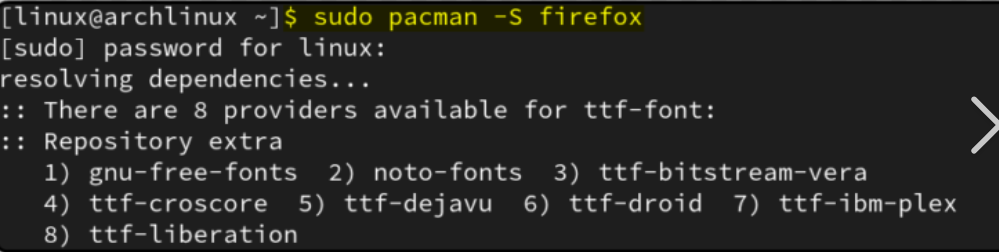
- Run Command: yay -S google-chrome Install from AUR using Yay (helper)
Ubuntu: APT + Snap
Ubuntu uses APT (Advanced Package Tool) as its primary package manager, offering a stable and well‑tested ecosystem. APT ensures that software is thoroughly vetted before release, making it ideal for users who prioritize reliability.
In addition, Ubuntu integrates Snap packages, which are containerized applications that include all dependencies. Snaps simplify installation and improve compatibility across different environments.
- Run Command: sudo apt update && sudo apt upgrade for Update system packages.
- Run Command: sudo apt install firefox for Install a package from official repository.
- Run Command: sudo snap install spotify for Install a Snap package.
Arch Linux vs Ubuntu: Performance and Resource Usage Compared
When analyzing Arch Linux vs Ubuntu, performance and resource usage remain critical factors for users deciding between these two distributions. The way each system handles customization, stability, and hardware efficiency reflects their core philosophies.
Arch Linux: Lightweight Customization
Arch Linux is renowned for its lightweight performance because users install only the components they need. By starting with a minimal base system, you can avoid unnecessary background services and applications, resulting in faster boot times and lower memory usage.
Regularly update with command: sudo pacman -Syu to keep performance optimized.
Ubuntu: Stable but Heavier
Ubuntu, on the other hand, prioritizes stability and ease of use, which often comes at the cost of higher resource usage. The default GNOME desktop environment is polished and user‑friendly but requires more memory and CPU compared to lightweight alternatives.
Strengths and Weaknesses of Arch Linux vs Ubuntu
When comparing Arch Linux vs Ubuntu, it’s important to evaluate the pros and cons of each distribution. Both have matured significantly, but their philosophies remain distinct as Arch Linux focuses on customization and bleeding‑edge software, while Ubuntu emphasizes stability and enterprise support.
The biggest strength of Arch Linux is that Arch Linux uses a rolling release model, meaning users always get the latest software updates without waiting for fixed cycles. This makes Arch Linux a strong choice for developers and enthusiasts who want cutting‑edge tools.
The main weakness of Arch Linux is the steep learning curve of Arch Linux. Its manual installation process and constant updates require technical knowledge and regular maintenance. While the rolling release model ensures the newest features, it can also introduce instability if updates are not managed carefully.
The biggest strength of Ubuntu is that Ubuntu offers stability and ease of use. With predictable release cycles and Long-Term Support (LTS) versions, Ubuntu guarantees five years of updates, making it a trusted choice for enterprises and cloud environments.
The main weakness of Ubuntu is that Ubuntu uses more system resources compared to Arch Linux. The default GNOME desktop environment, while polished and user‑friendly, consumes more memory and CPU. Another weakness of Ubuntu is that Ubuntu offers less customization out of the box, as many components are pre‑configured.
Conclusion
When looking at Arch Linux vs Ubuntu, the choice really depends on whether you prefer control or convenience. Both are strong Linux distributions, but they are designed for different types of users.
Arch Linux is best for advanced users, developers, and enthusiasts who want full control over their system. Its rolling release model means you always get the newest software and updates. The ability to customize everything makes Arch Linux lightweight and efficient.
Ubuntu is the better choice for beginners, enterprises, and cloud environments. With Long Term Support (LTS) releases, Ubuntu provides five years of guaranteed stability and security updates. The guided installation process makes it easy to set up, and broad hardware support ensures it works smoothly on most devices.
FAQs
Is Arch Linux better than Ubuntu for beginners?
No, Arch Linux has a steep learning curve. Ubuntu is easier for beginners because of its guided installer and stability.
Does Arch Linux vs Ubuntu offer better customization?
Arch Linux offers more customization since you build the system from scratch. Ubuntu is less flexible but easier to set up.
Which is more stable Arch Linux vs Ubuntu?
Ubuntu is more stable with Long Term Support (LTS) releases. Arch Linux is bleeding‑edge but can be less predictable.
Is Arch Linux vs Ubuntu better for enterprises?
Ubuntu is better for enterprises due to Canonicals support and security updates. Arch Linux is more suited for advanced users.
Which uses fewer resources Arch Linux vs Ubuntu?
Arch Linux is lightweight because you install only what you need. Ubuntu uses more resources, especially with GNOME desktop.
Discover more from Root Learning
Subscribe to get the latest posts sent to your email.